
Seedream 5.0 Pro vs Grok Imagine for Documentation Images: Latency,

Seedream 5.0 Pro vs Grok Imagine for Documentation Images: Latency, Cost and Accuracy in Python
Published: November 6, 2026
Last Updated: November 6, 2026
Last Updated: November 6, 2026
The same header prompt on both models. Quayline is a fictional open-source project we made up for this test.
Developer documentation uses more images than most people notice: a header for every guide, a concept diagram for every moving part, and a fresh version every time something is renamed. Teams that generate these images with an API soon find that the model’s picture quality is only half the question. The other half is engineering. How long does a task take? Does it queue under load? What do the size settings really return? Which mistakes get caught by validation, and which reach your docs?
We set up one workload and ran it on two image models with very different profiles. The workload belongs to Quayline, an open-source message queue we invented. Its docs need 16:9 page headers and simple labelled architecture diagrams: producer, queue, consumer, retries, partitions. The two models were seedream-5-0-pro, ByteDance’s quality-first Seedream model, and grok-imagine-image, xAI’s standard Grok Imagine image model. Both are called through the same endpoint with the same request shape, which makes a fair comparison easy to script.
We ran nine tests: 41 tasks, 44 images and six deliberately invalid requests. All of it cost $0.924, including a two-image probe at the start. The samples are small and we give the size for every number. Our account also ran other jobs during some of the tests, so treat the timings as field measurements, not a lab benchmark.
This article is part of
Technology
Table of Contents
The walkthrough
The video covers the nine tests in under three minutes.
The client
Both models are asynchronous. A POST to /v1/images/generations returns a task ID in data[0].task_id. A GET on /v1/tasks/{task_id} returns the status, an actual_time field with the server-side task time in whole seconds, the charged cost and, once complete, the image URLs. The request fields differ slightly. Grok takes aspect_ratio and resolution (1k or 2k) and allows n from 1 to 10. Seedream takes size (a tier, an aspect ratio or exact pixels), resolution (1K, 1.5K or 2K) and output_format, and allows only n=1.
The code below is a simplified version of the runner we used, not the exact file. The real one took the job list from a JSON file, ran a thread pool, retried downloads and wrote one JSON line per task. The parts that matter are kept: the task ID is written to disk before the first poll, and a network error during polling never leads to a second submission.
import json, os, time, requests
BASE = os.environ[“IMAGE_API_BASE”] # placeholder host
HDR = {“Authorization”: f”Bearer {os.environ[‘IMAGE_API_KEY’]}”}
DONE = {“completed”, “failed”, “cancelled”}
def run(name, payload, first_wait, every, log=”tasks.log”):
t0 = time.time()
r = requests.post(f”{BASE}/v1/images/generations”,
headers=HDR, json=payload, timeout=60)
if r.status_code == 400: # validation error: no task, no bill
return {“name”: name, “error”: r.json()[“error”][“message”]}
r.raise_for_status()
tid = r.json()[“data”][0][“task_id”]
with open(log, “a”) as f: # record before polling
f.write(f”{name}\t{tid}\n”)
time.sleep(first_wait)
while True:
try:
d = requests.get(f”{BASE}/v1/tasks/{tid}”,
headers=HDR, timeout=30).json()[“data”]
except requests.RequestException:
time.sleep(every) # retry the poll, never the submit
continue
if d[“status”] in DONE:
d[“wall_s”] = round(time.time() – t0, 1)
return d
time.sleep(every)
grok = {“model”: “grok-imagine-image”, “prompt”: “…”,
“aspect_ratio”: “16:9”, “resolution”: “1k”, “n”: 1}
seedream = {“model”: “seedream-5-0-pro”, “prompt”: “…”,
“size”: “16:9”, “resolution”: “1K”}
Test 1: Sequential latency
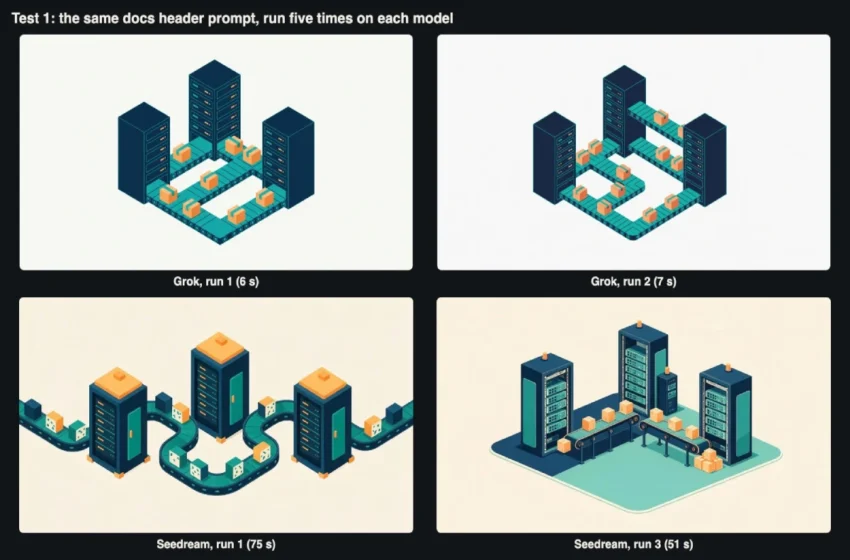
We sent the same header prompt five times to each model, one task at a time: “Wide header illustration for a developer documentation site: an isometric scene of small parcels moving along conveyor belts between three server racks, flat colours of navy, teal and soft orange on an off-white background, clean technical style. No text, no letters, no logos.” Grok ran at 16:9 and 1k; Seedream at 16:9 and 1K.
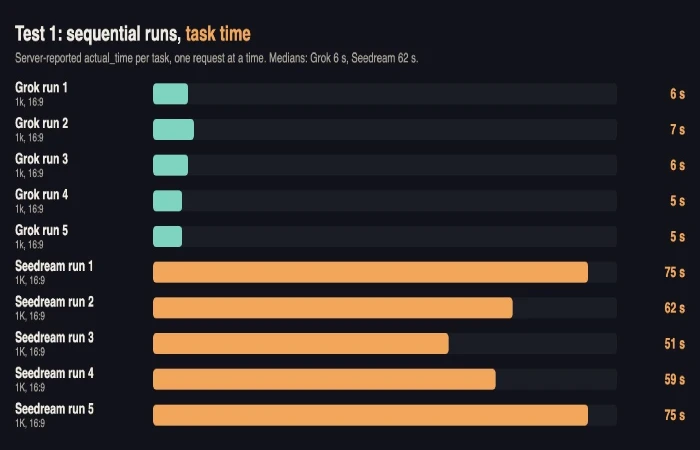
Server-reported task time for five sequential runs per model.
The gap was large and consistent. Grok’s task times were 6, 7, 6, 5 and 5 seconds, a median of 6. Seedream’s were 75, 62, 51, 59 and 75 seconds, a median of 62. Our wall-clock times, measured with a 4-second poll in this test, were about 10 seconds for Grok and 53 to 76 seconds for Seedream. Submitting took under a second on both. All ten tasks completed on the first try.
The images differed too. Grok drew a compact isometric block in the middle of the frame on a near-neutral off-white, which we measured between #F7F7F7 and #F8F6F0 in the corners. Seedream filled the whole width with belts, and its background came out warm cream (#F8EFE0 to #FEF6EA) though the prompt said off-white. Seedream also varied more between runs. The average pixel difference between pairs of its five images was 42.6 on a 0 to 255 scale, against 26.1 for Grok. If you want a set of headers that look alike, Grok’s consistency helps. If you want options, Seedream gives more.
Test 2: A burst of six
Docs builds often generate images in batches, so we submitted six header tasks to each model at the same moment and polled each once a second.
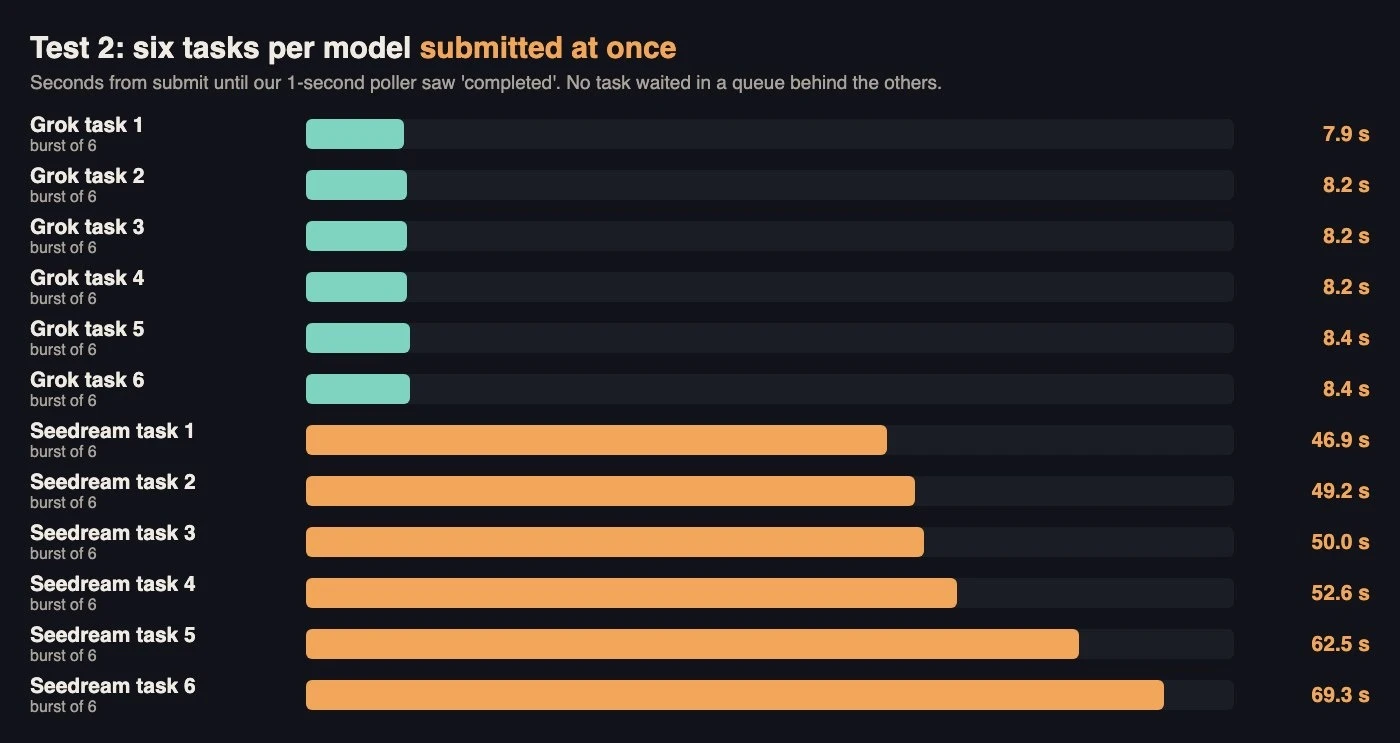
Time from submit to “completed” for six tasks submitted together.
Neither model queued our tasks behind each other. All six Grok tasks finished between 7.9 and 8.4 seconds after submission, with task times of 6 or 7 seconds. The six Seedream tasks finished between 46.9 and 69.3 seconds, with task times of 46 to 68 seconds, a spread similar to the sequential run. In practice, the whole burst took as long as its slowest task. At this small scale, concurrency is free, and the batch time is set by the model’s own spread. We did not test larger bursts or look for a concurrency limit.
Test 3: Labelled diagrams
This is the hardest part of the workload. We wrote four diagram prompts, each ending with “Flat technical diagram on a plain white background, navy outlines, teal fills, clean sans-serif labels, no other text.” Diagram 1 is Producer to Queue to Consumer. Diagram 2 adds a “retry 3x” arrow back to the queue and a “failed” arrow to a “Dead Letter Queue”. Diagram 3 is a “Topic” fanning out to “Billing”, “Search” and “Email”. Diagram 4 is a “Broker” holding partitions “P0” to “P3” with the caption “Partition key: user_id”. Grok ran at 16:9 2k, Seedream at 16:9 1.5K as PNG.
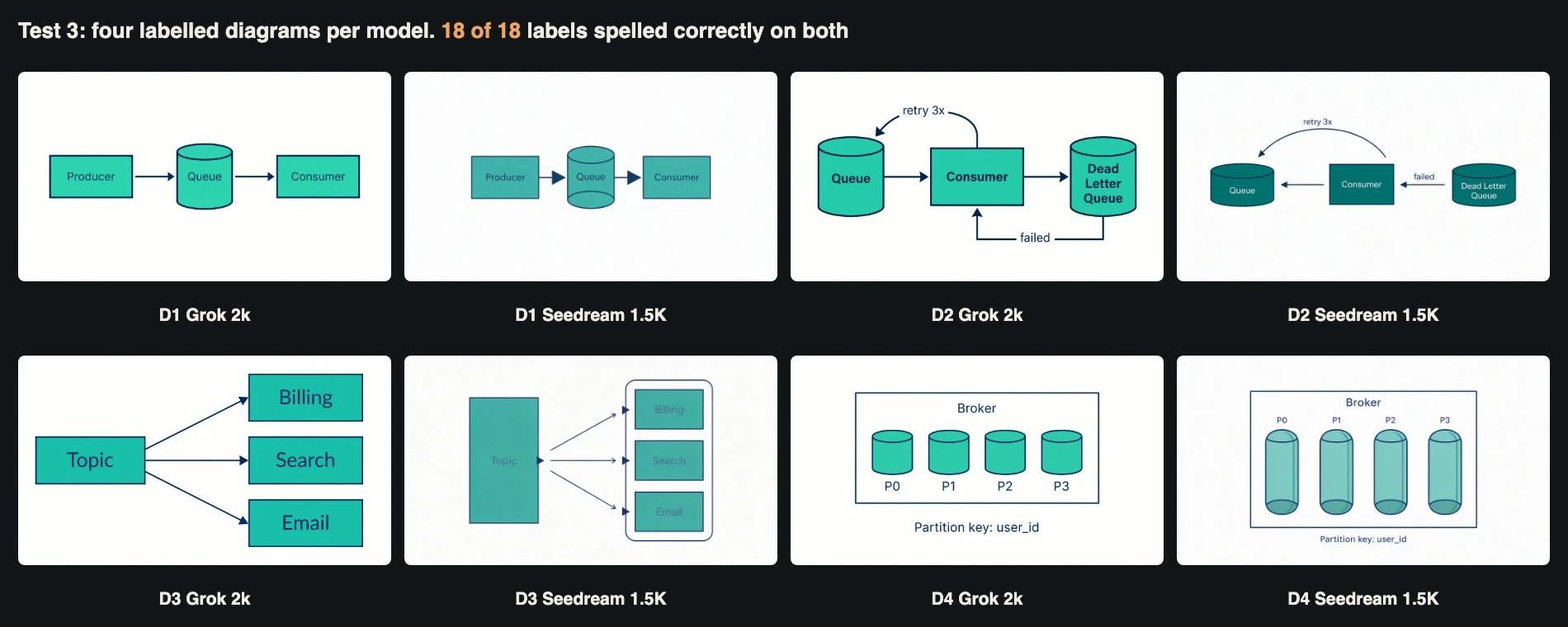
Four diagrams per model. Every label was spelled correctly; the semantics were another matter.
Spelling was perfect on both models: all 18 labels in each set were correct, including the underscore in user_id. We checked with Apple’s Vision text recogniser and then by eye. The recogniser itself made mistakes we had to correct by hand. It read “P0” as “PO” on both models, read “Topic” with Cyrillic look-alike letters, and split “Dead Letter Queue” over three lines. If you automate label checks, normalise these cases or your test will fail correct images.
Diagram 2 is where both models went wrong, and spelling checks would not have caught it.
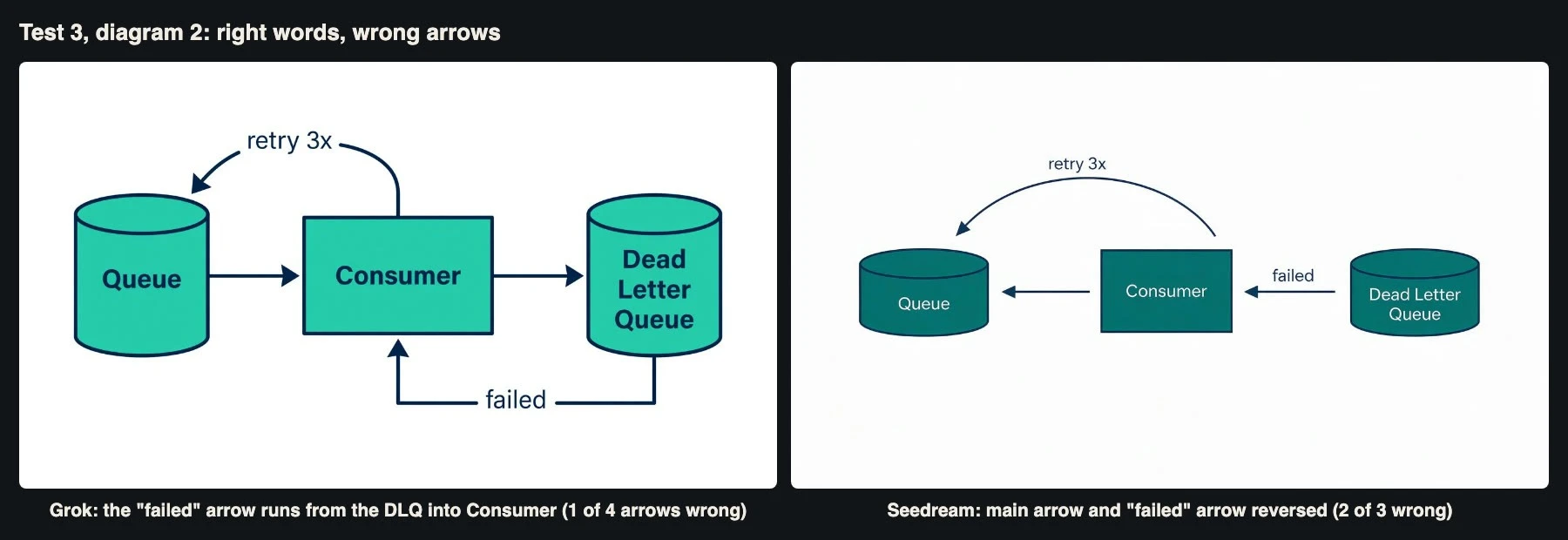
Every word is right. The flow is not.
We asked for three arrows: Queue to Consumer, “retry 3x” from Consumer back to Queue, and “failed” from Consumer to the dead letter queue. Grok drew four. Three were right, but it put the “failed” label on an extra arrow running from the dead letter queue back into Consumer, which describes a different system. Seedream drew three, and two pointed the wrong way: the main arrow ran from Consumer to Queue, and “failed” ran from the dead letter queue to Consumer. A reader who trusts that diagram would learn the wrong thing about how retries work. Diagrams 1, 3 and 4 had correct arrows on both models.
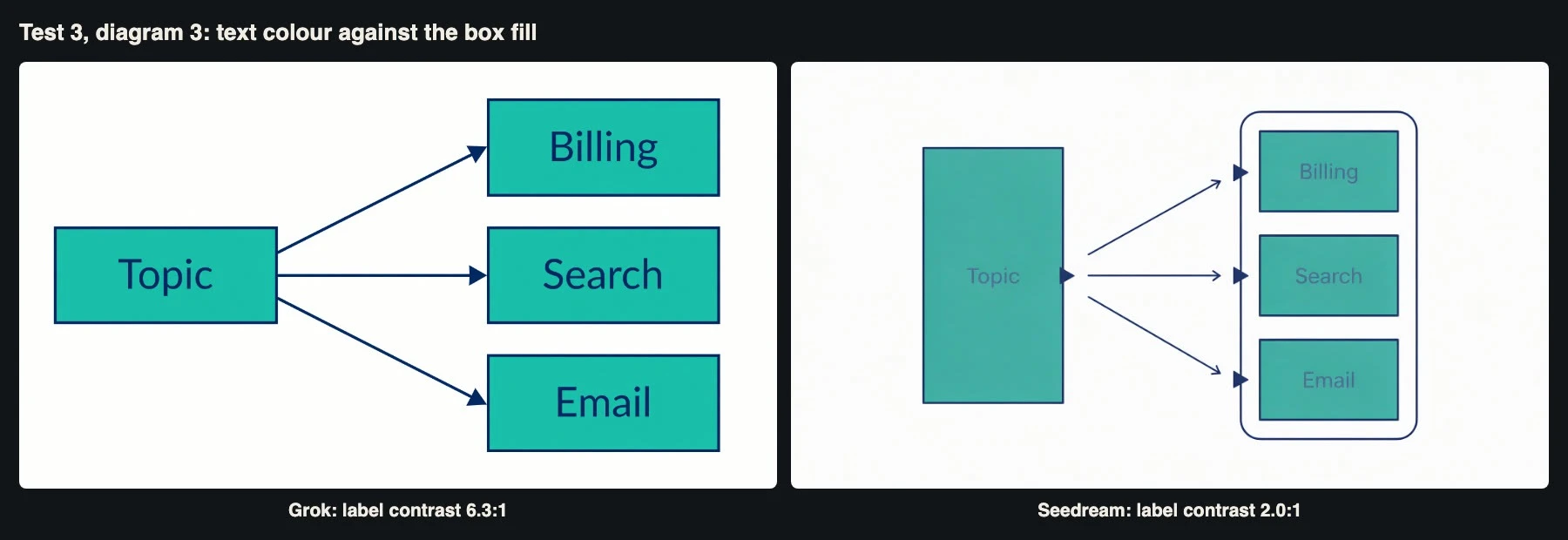
Contrast ratio between label text and box fill, measured from the pixels.
Diagram 3 showed a second failure. Seedream drew the labels in a dark teal on a mid-teal fill. We measured the contrast ratio from the pixels at 2.0:1 for “Topic” and 2.1:1 for “Billing”, well below the 4.5:1 that WCAG asks for normal text. Grok’s labels measured 6.3:1 and 6.4:1. Seedream’s “Producer” label in diagram 1 measured 5.1:1 and its other diagrams looked readable, so this was probably a single bad roll. A pipeline should still check contrast automatically, because docs readers include people with low vision.
Timing matched Test 1: Grok’s diagram tasks took 10 to 12 seconds at 2k, and Seedream’s took 56 to 70 seconds at 1.5K.
Test 4: What the size tiers return
Size settings are easy to misread, so we ran diagram 1 at the remaining tiers and recorded what came back.
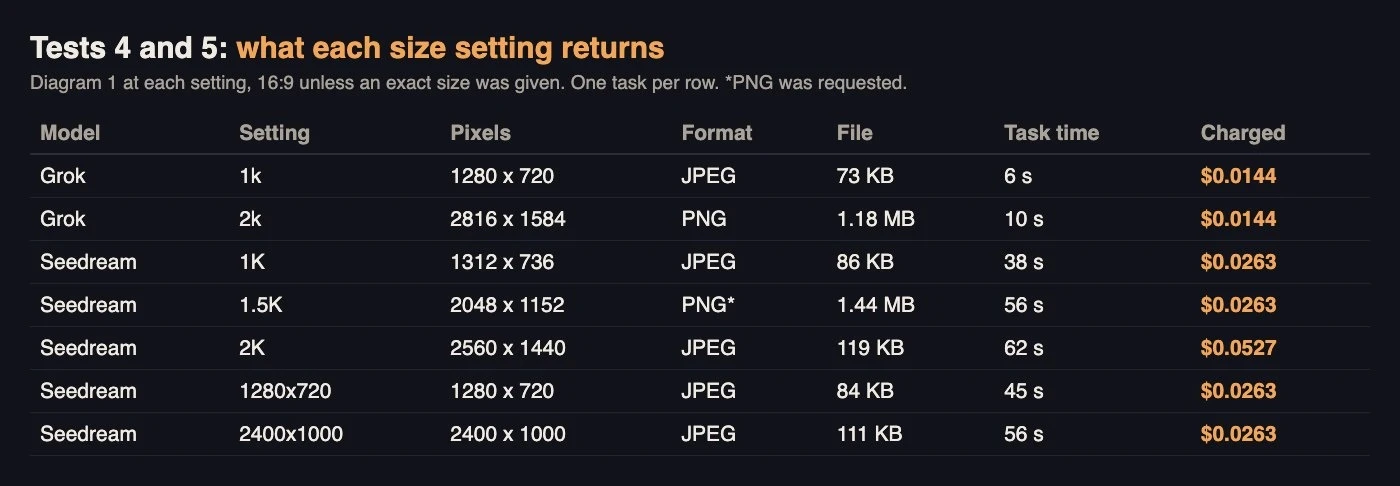
One task per row, so the times are single samples.
At 16:9, Grok’s 1k returned 1280 x 720 and its 2k returned 2816 x 1584, both at the same price: $0.0144 per image on our account. Seedream’s 1K returned 1312 x 736, 1.5K returned 2048 x 1152 and 2K returned 2560 x 1440. On Seedream, 1K and 1.5K cost the same, $0.0263 on our account, and 2K cost twice that at $0.0527. That makes 1.5K the obvious default for Seedream docs images, because you get 2.4 times the pixels of 1K for the same price.
Formats are handled differently. Grok returned JPEG at 1k and PNG at 2k, and has no format setting. Seedream returns JPEG by default, with PNG on request through output_format. For flat diagrams, the format matters more than the pixels. The 2560 x 1440 Seedream JPEG was 119 KB, while the 2048 x 1152 PNG we requested in Test 3 was 1.44 MB. A docs site should convert these files at build time either way.
One more timing note, from single samples: Seedream’s 1K task took 38 seconds and its 2K task took 62, so the higher tier may also cost time.
Test 5: Exact pixel sizes
Seedream also accepts an exact size, which matters when a docs theme has a fixed header slot. The total must be between 921,600 and 4,624,220 pixels. We asked for 1280×720, the exact minimum, and 2400×1000 for a wide banner. Both came back at exactly the requested size, as JPEGs of 84 KB and 111 KB, in 45 and 56 seconds. Both were charged at the lower price, $0.0263. The model page says exact sizes up to 2,601,124 pixels are billed at the lower tier, and our 2.4-megapixel banner fell under that line. Grok has no equivalent; you pick a ratio and crop.
For a documentation pipeline this is a real advantage. A fixed theme slot can be filled without a resize step, which keeps thin diagram lines sharp. If your slot is fixed and your budget is tight, the Seedream 5.0 Pro API lets you ask for the exact size at the lower price, provided you keep the pixel count under the tier line.
Test 6: Four variants in one call
Grok accepts n up to 10, so we asked for four headers in one request. All four arrived in a single task with a task time of 7 seconds, and the charge was $0.0576, exactly four times the single price. Seedream allows only one image per request, so the equivalent is four tasks in parallel, which Test 2 showed takes as long as the slowest task, around a minute.
The four Grok images varied more than the five sequential runs in Test 1. One was a white line drawing, one used orange belts with teal parcels, and two were close to the Test 1 style. For a “pick one of four” step in a docs editor, the Grok image API returns choices in about the time it takes to open a dialog. The same step on Seedream means asking the user to wait a minute.
Test 7: Fixing a label with an edit
Docs change. Suppose Quayline renames “Consumer” to “Worker”. Regenerating the diagram risks a different layout, so we tried an edit instead, passing the original image in image_urls. For Seedream we ran it twice: once with the label’s location given as a box, <bbox> with coordinates on a 0 to 1000 scale taken from our OCR result, and once with a plain instruction. For Grok we used the plain instruction: “Change the label “Consumer” to “Worker”. Keep the same font, size and colour, and change nothing else in the image.”
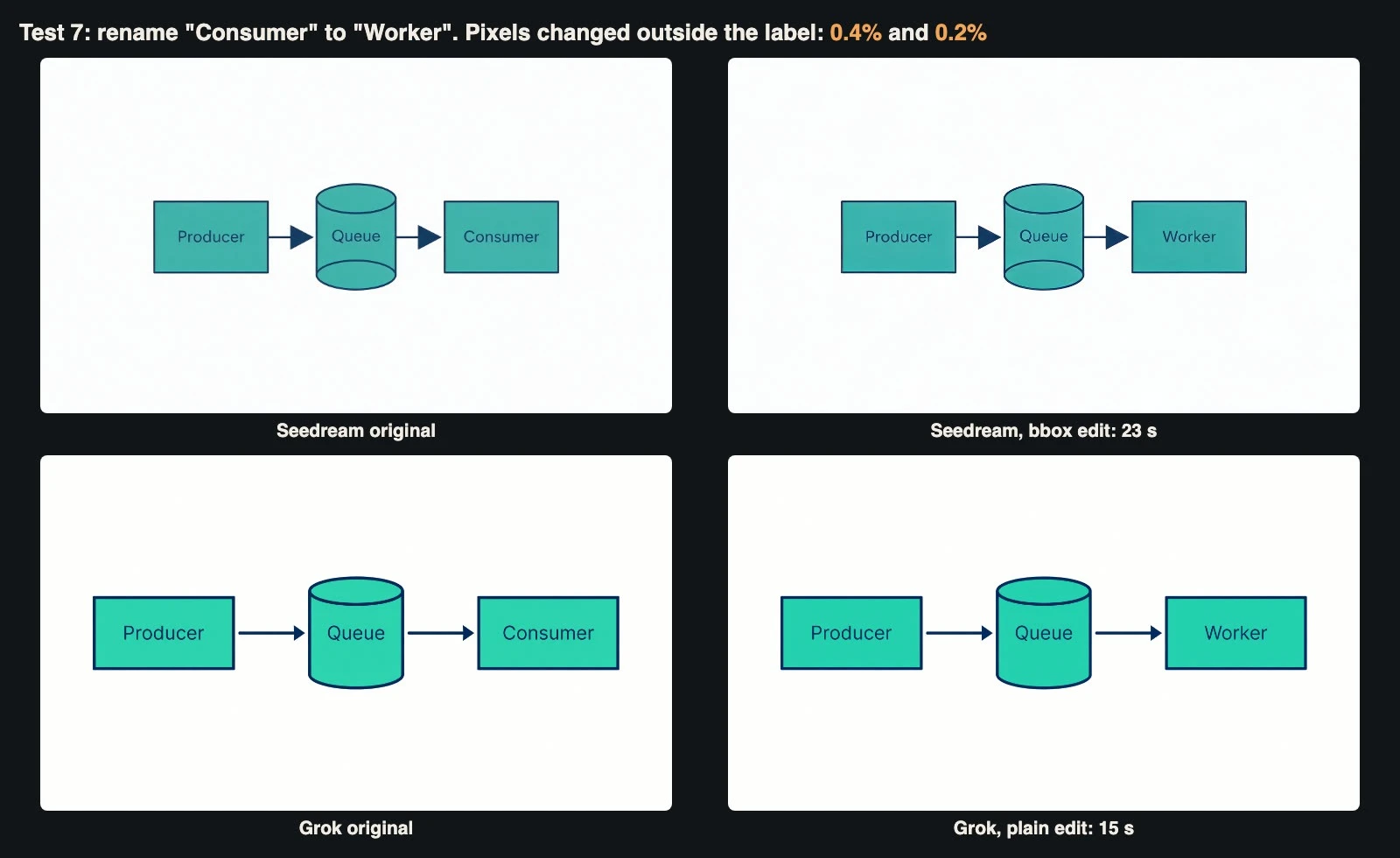
All three edits changed only the label.
All three edits worked. OCR read “Worker” in every output, and the rest of each diagram stayed put. To measure that, we compared each edit with its original pixel by pixel, outside a margin around the label. Only 0.37 percent of pixels changed outside the label in the Seedream box edit, 0.36 percent in the plain Seedream edit and 0.18 percent in the Grok edit. Those small numbers are mostly compression noise along edges.
Two details are worth knowing. Seedream’s output came back at 1424 x 800, smaller than the 2048 x 1152 input. We had sent size as auto without a resolution, and the default resolution is 1K. If you edit a 1.5K image, send “resolution”: “1.5K” to keep the size. Grok kept its 2816 x 1584 size. On cost, Seedream’s first reference image is free, so both Seedream edits were charged $0.0263. Grok charges for references, so its edit came to $0.01584. Timing was a single sample per setting: the Seedream box edit took 23 seconds, the plain Seedream edit 65, and the Grok edit 15.
Test 8: What validation catches
A pipeline needs to know which mistakes fail fast. We sent six invalid requests and recorded what came back. Every one was rejected with HTTP 400 in under a second (623 to 932 ms), and no task ID was returned, so there was no task to bill.
| Request | Error message (shortened) |
| Seedream with n: 2 | “only generates a single image per request, n must be 1 (got: 2)” |
| Seedream with size: “800×600” | “requires total pixels (width*height) within [921600, 4624220], got: 800×600 = 480000” |
| Seedream with no prompt | “prompt parameter is required” |
| Grok with aspect_ratio: “5:4” | “aspect_ratio “5:4″ is not supported” |
| Grok with quality: “high” | “quality is only supported by grok-imagine-image-2.0” |
| Grok with n: 11 | “n must be between 1 and 10” |
The messages are specific enough to log and act on. The lesson for client code is to treat a 400 as final: do not retry it, and fix the payload. Pre-validating in your own code is still cheaper than a round trip. A local check for Seedream’s pixel range and Grok’s ratio list takes a few lines. The errors that matter most, like the reversed arrows in Test 3, pass validation and complete normally, so they need review.
Test 9: Cost and a polling schedule
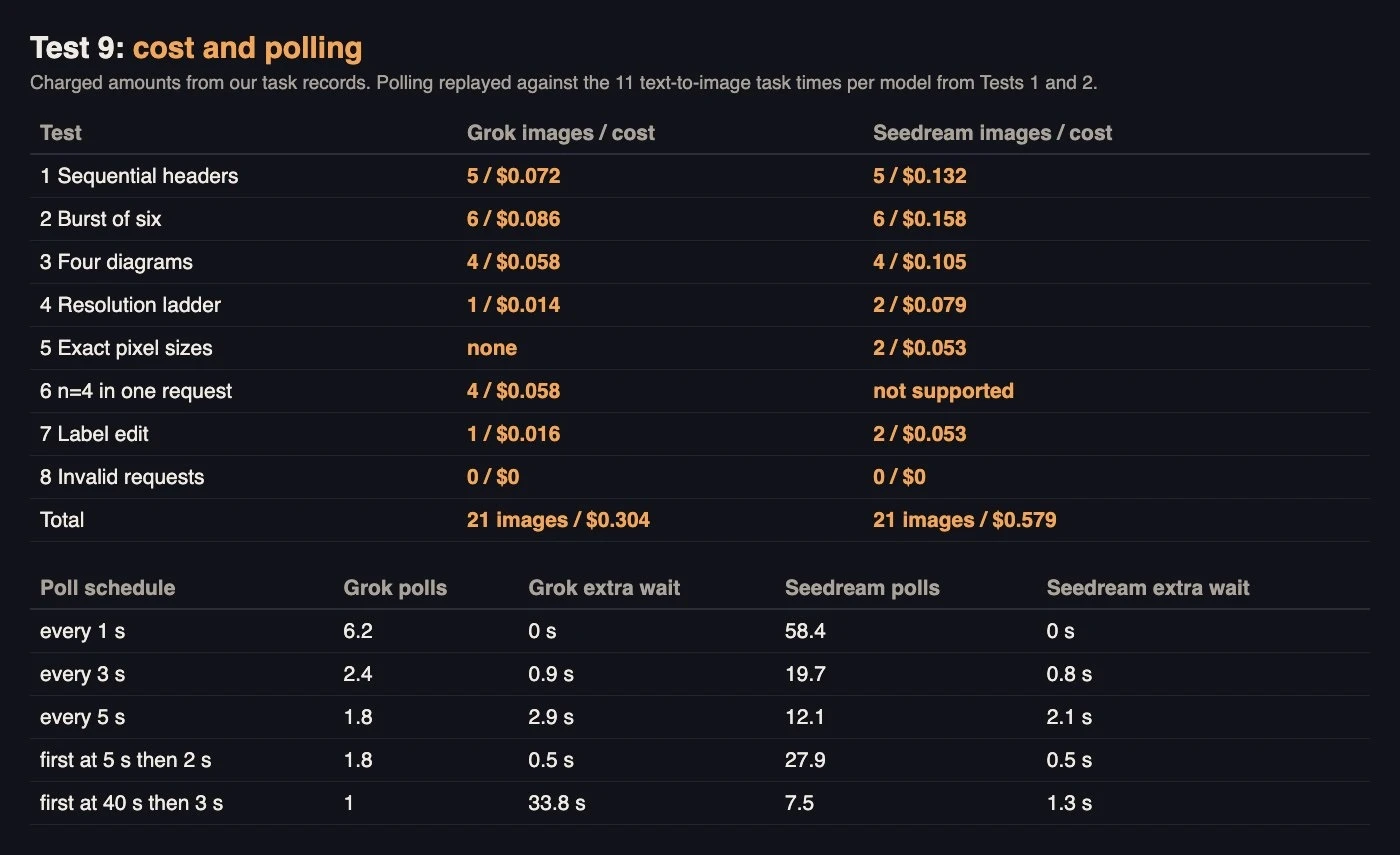
Costs per test, and polling schedules replayed against our measured task times.
Across the tests, 21 Grok images cost $0.304 and 21 Seedream images cost $0.579. The two-image probe at the start added $0.041. Per image, at 1K and similar settings, Seedream cost about 1.8 times as much as Grok on our account. Grok charged the same at 1k and 2k; Seedream charged double at 2K.
Because the two models finish at such different times, one polling schedule does not suit both. We took the 11 text-to-image task times per model from Tests 1 and 2 and replayed five schedules against them. The extra wait column is how long, on average, a finished image waits before the next poll sees it, based on whole-second task times. Polling every second gives no extra wait but costs 58 requests per Seedream image. “First poll at 5 seconds, then every 2” suits Grok: 1.8 polls and half a second of wait. For Seedream, “first poll at 40 seconds, then every 3” cuts polls to 7.5 for 1.3 seconds of wait, but the same schedule would add 34 seconds to every Grok image. Set the schedule per model.
A docs build that makes one header and three diagrams per guide would spend about $0.06 per guide on Grok or $0.11 on Seedream at these settings, before any retries. For a project with a hundred guides, that is $6 to $11. Review time will cost far more than the API.
A checklist for docs pipelines
- Write every task ID to disk before polling, and retry polls, never submissions.
- Poll per model: start at about 5 seconds for Grok and about 40 seconds for Seedream.
- Expect no queuing at small bursts. Batch time equals the slowest task.
- Use Seedream at 1.5K, not 1K: same price, 2.4 times the pixels. Use exact sizes for fixed theme slots.
- Use Grok’s n when a person picks from several options.
- Check diagram meaning, not just spelling. OCR cannot see a reversed arrow.
- Check label contrast automatically against 4.5:1.
- Edit, do not regenerate, when a label changes, and set the resolution on Seedream edits.
- Treat a 400 as final, and pre-validate sizes and ratios in your own code.
The bottom line
On this workload the two models split along a clear line. Grok was about ten times faster per task, cheaper per image, more consistent between runs, and returned several choices in one call. Seedream was slower and pricier, but offered exact pixel sizes, a cheaper large tier at 1.5K, a free first reference for edits and more variety between runs. Both spelled every label correctly, and both got the arrows wrong in the one diagram where direction carried the meaning.
That last point matters more than the speed gap. Generated diagrams are fine for headers and simple flows, and edits are a reliable way to keep them current. For anything where the arrows teach the reader how the system works, a person who knows the system has to look at the picture before it ships. Treat the model as a fast illustrator, not as a source of truth about your architecture.