



Technology Decisions for SMBs: Strategic Framework (2026)
Every small business runs on technology. But not every small business runs on the right technology.
The gap between those two statements costs SMBs thousands of dollars each year in redundant subscriptions, underused tools, and security vulnerabilities that a single phishing email can exploit. The problem is rarely about choosing the “best” product. It’s about choosing the right product for your business — at the right time, for the right reasons.
Real‑world examples show how much this matters in practice; for instance, TechQuarters built its reputation by staying ahead of the curve on cloud adoption and managed services for London‑based businesses. You’ll learn how to evaluate, prioritize, budget for, and implement technology without wasting money or creating new problems.
This is built for SMB owners, founders, and IT decision-makers running teams of 5 to 250 employees — the stage where technology choices compound fastest.
Table of Contents
What You Need to Know
- What are technology decisions for SMBs? → Strategic choices about which tools, platforms, and systems to adopt based on business goals — not vendor hype.
- Why do they matter? → Poor decisions drain budgets, create security gaps, and slow growth. Good ones compound over time.
- How to decide? → Use a business-first framework: define goals → audit current stack → score with the 4-Pillar Matrix → calculate TCO → pilot before committing.
- Biggest mistake? → Buying new technology to fix a process problem. Standardize workflows first.
- Who should help? → Consider MSPs or fractional CTOs for expert guidance without full-time hiring costs.
What Are Technology Decisions for SMBs?
Technology decisions for SMBs are the strategic choices a small or medium-sized business makes about which digital tools, platforms, and systems to adopt, replace, or retire. These decisions span cloud infrastructure, cybersecurity, customer relationship management, automation, and communication — and they directly impact growth, operational efficiency, and competitive positioning.
That definition sounds straightforward. The reality is messier.
For an enterprise with a dedicated CIO and a $2M IT budget, testing three CRM platforms in parallel is a Tuesday. For an SMB owner who also manages payroll, client calls, and the office Wi-Fi, a single wrong technology choice can consume months of effort and thousands of dollars.
Why Technology Decisions Hit SMBs Differently
Three factors make these decisions uniquely high-stakes for smaller businesses:
- Tighter margins for error. A $15,000 annual subscription that goes underused is background noise for a Fortune 500 company. For a 30-person firm, it’s the difference between hiring a part-time employee and not.
- Fewer decision-makers. Technology choices in SMBs are often made by one or two people — sometimes without formal IT training. This increases the risk of misaligned purchases and shadow IT.
- Faster compounding. Good early technology decisions create a foundation for scalable growth. Poor ones create technical debt that gets harder to fix over time.
The goal isn’t to become a technology expert. It’s to develop a reliable process for making technology decisions so you stop buying on impulse and start investing on strategy.
The 5 Core Technology Categories Every SMB Must Address
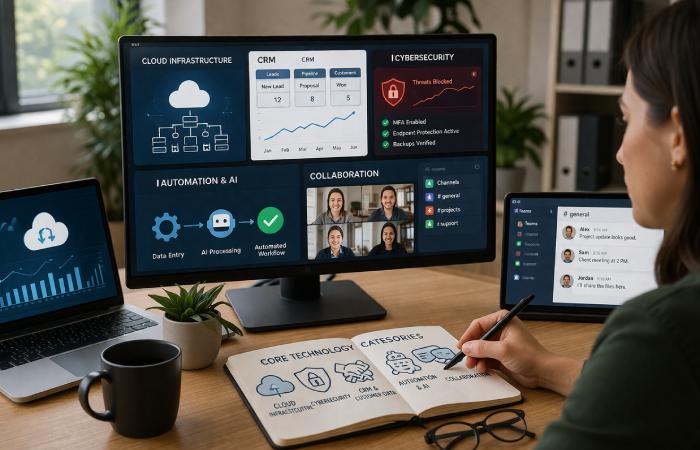
Before evaluating individual products, understand the five categories where technology decisions matter most. Every SMB — regardless of industry — faces trade-offs in each area.
Cloud Infrastructure and SaaS Platforms
Cloud computing has fundamentally changed how SMBs access technology. Instead of purchasing servers and maintaining physical infrastructure, businesses can subscribe to cloud-based services that scale with demand.
As outlined in NIST’s definition of cloud computing, it is a model for enabling convenient, on-demand network access to a shared pool of configurable computing resources. For SMBs, this translates into three practical benefits: lower upfront costs, remote accessibility, and automatic updates.
Key decision: Choose between SaaS (software-as-a-service) for specific tools like email or CRM, IaaS (infrastructure-as-a-service) for hosting, or a hybrid approach. Most SMBs start with SaaS and expand as needed.
Cybersecurity and Data Protection
This is non-negotiable. According to CISA’s cybersecurity guidance for small businesses, organizations of all sizes face increasing threats — and smaller businesses are frequently targeted because attackers assume their defenses are weaker.
Every SMB should have these fundamentals in place:
- Multi-Factor Authentication (MFA) on every account, especially email and financial tools
- Endpoint Detection and Response (EDR) replacing outdated antivirus software
- Regular security awareness training for all employees
- A tested backup and disaster recovery plan following the 3-2-1 rule (3 copies, 2 media types, 1 offsite)
Key decision: Determine whether to manage security in-house or partner with a managed security services provider. For most SMBs under 100 employees, outsourcing is more cost-effective and reliable.
CRM and Customer Data Management
A CRM system centralizes customer interactions, tracks sales pipelines, and provides the data visibility needed for informed decisions. Without one, customer data lives in spreadsheets, email threads, and individual memories — all of which are fragile and unsearchable.
Key decision: Match CRM complexity to your actual needs. A 10-person service business often gets more value from a lightweight CRM than from a full enterprise platform that requires dedicated administration.
AI, Automation, and Workflow Tools
AI has moved from buzzword to practical tool. For SMBs, the highest-ROI applications are narrow and specific:
- Automating data entry and invoice processing
- Generating first-draft emails and meeting summaries
- Powering customer service chatbots for after-hours support
- Running basic analytics on sales and operational data
Key decision: Adopt AI for specific, measurable tasks — not as a broad initiative. Establish guardrails for what data employees can input into AI tools, especially customer information and proprietary business data.
Communication and Collaboration Systems
Unified communication platforms (Microsoft 365, Google Workspace, Slack) reduce tool sprawl and create a central hub for team collaboration. The shift to hybrid and remote work has made this category essential rather than optional.
Key decision: Standardize on one ecosystem rather than letting teams choose their own tools. Fragmentation creates security gaps, training overhead, and data silos.
A Step-by-Step Technology Decision Framework
Most technology purchases fail not because the product was bad, but because the process for choosing it was absent. Here’s a framework that replaces gut feelings with structured evaluation.
Step 1 — Define Business Goals First
Start with the business problem, not the technology solution. Ask: “What operational bottleneck, customer experience gap, or security risk are we trying to address?”
If you can’t articulate the specific problem, you’re not ready to buy.
Step 2 — Audit Your Current Technology Stack
Before adding anything new, document what you already have. Create a simple inventory:
- Every software subscription and its monthly cost
- Every piece of hardware and its age
- Who uses what — and how often
- What’s redundant, underused, or causing friction
Many SMBs discover they’re paying for tools no one uses or running three apps that do the same thing.
Step 3 — Evaluate with the 4-Pillar Scoring Matrix

Score each technology option on four dimensions. Rate each from 1 (poor) to 5 (excellent):
| Evaluation Pillar | What to Assess | Score (1–5) |
|---|---|---|
| Business Alignment | Does it directly solve the defined business problem? | ___ |
| Scalability & Integration | Does it integrate with your existing stack and grow with you? | ___ |
| Security & Compliance | Does it meet your industry’s security and regulatory requirements? | ___ |
| Total Cost of Ownership | What’s the full cost — including setup, training, and ongoing fees? | ___ |
Decision rule: Any option scoring below 3 on Business Alignment or Security is disqualified, regardless of other scores. A combined score of 16+ out of 20 signals a strong fit.
Step 4 — Calculate Total Cost of Ownership (TCO)
The subscription fee is just the surface. True cost includes:
- Implementation and migration effort
- Employee training time (measured in billable hours)
- Integration development or middleware costs
- Ongoing support and maintenance fees
- Future migration costs if you switch later
A tool that costs $50/month but requires 40 hours of setup is more expensive in Year 1 than a $100/month tool with instant onboarding.
Step 5 — Pilot, Measure, and Scale
Never roll out company-wide on day one. Run a 30–60 day pilot with a small team:
- Define three measurable success criteria before the pilot starts
- Collect structured feedback from pilot users weekly
- Compare actual results against your projected ROI
- Only commit to full deployment if the pilot meets at least two of three criteria
How to Budget for Technology as an SMB
The 3–10% Revenue Rule
Industry benchmarks and IT budget studies suggest SMBs typically allocate somewhere in the low‑single to low‑double‑digit percentage of annual revenue to technology, often in the 3–10% range depending on sector, growth stage, and regulatory requirements. Companies in regulated industries (healthcare, finance) or those in rapid growth mode typically fall toward the higher end.
Operational vs. Strategic Spending
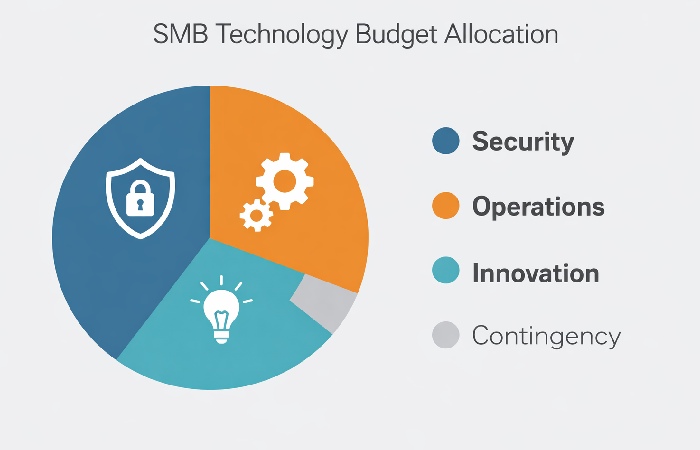
Split your technology budget into three categories:
- Essential / Security (40–50%): Cybersecurity, backups, core infrastructure, compliance tools. These are non-negotiable.
- Operational Efficiency (30–40%): CRM, collaboration platforms, automation tools. These drive daily productivity.
- Strategic / Innovation (10–20%): AI experiments, new market tools, competitive technology. These are your growth bets.
Keep a contingency reserve of 3–5% of the IT budget for emergencies — hardware failures, security incidents, or urgent compliance needs.
Calculating the “Cost of Inaction”
When evaluating whether a technology investment is “worth it,” most SMBs only calculate the cost of buying. They forget to calculate the cost of not buying.
For example:
- Security breach cost: Various analyses, including those referenced in the U.S. Small Business Administration’s cybersecurity resources, suggest the average cost of a data breach for SMBs can range roughly from $120,000 to $1.24 million, depending on the incident’s severity and industry. That makes a $2,000/year EDR solution look very different.
- Productivity loss: If a manual process costs your team 10 hours per week and automation costs $200/month, the math is simple.
- Competitive disadvantage: Competitors using CRM and automation will outperform those relying on spreadsheets — and that gap widens over time.
Common Technology Mistakes SMBs Make
1. Buying technology before mapping processes.
Your technology problem is probably a process problem. If your sales workflow is chaotic, a CRM won’t fix it — it’ll just digitize the chaos. Standardize your processes first, then apply technology to accelerate them.
2. Ignoring integration and vendor lock-in.
A tool that doesn’t connect to your existing systems creates data silos. Before committing, ask: Does it have an API? Does it integrate with our current stack? What happens to our data if we switch?
3. Underinvesting in cybersecurity.
Many SMBs treat cybersecurity as optional until something goes wrong. By then, the cost is exponentially higher. MFA, EDR, employee training, and tested backups are baseline requirements — not extras.
4. Skipping employee training and adoption planning.
A tool your team doesn’t use is a tool you wasted money on. Allocate 10–15% of any technology purchase budget to training and change management.
5. Letting one person make all technology decisions.
When the “most tech-savvy employee” unilaterally selects tools, you get shadow IT — unauthorized apps and data flows that create security, compliance, and integration risks. Technology decisions should involve business leadership, not just technical comfort.
When to Hire vs. Outsource IT Support
One of the most consequential technology decisions an SMB faces is who manages the technology. Three models dominate:
| Factor | In-House IT Hire | Managed Service Provider (MSP) | Fractional CTO / Virtual CIO |
|---|---|---|---|
| Best for | Companies with 100+ employees needing dedicated daily support | Companies with 10–100 employees wanting proactive management | Companies needing strategic guidance without operational overhead |
| Typical cost | $55,000–$90,000+/year (salary + benefits) | $1,000–$5,000/month (predictable) | $2,000–$8,000/month (part-time) |
| Strengths | On-site presence, deep company knowledge, immediate response | 24/7 monitoring, broad expertise, predictable costs | Strategic roadmapping, vendor evaluation, board-level communication |
| Limitations | Single point of failure, limited breadth, high fixed cost | Less company-specific knowledge, potential response time concerns | Not hands-on for daily operations |
| When to choose | Daily technical needs exceed what an MSP provides | You want enterprise-grade support without enterprise-grade costs | You need strategic direction before (or alongside) operational support |
Here’s the uncomfortable truth: a $500/month managed service provider can often outperform a $60,000/year junior IT hire. The MSP brings a team, 24/7 monitoring, established toolsets, and vendor relationships that no single junior employee can replicate. Most SMBs under 75 employees get better outcomes by outsourcing IT and investing the savings in strategic technology initiatives.
Building Your SMB Technology Roadmap
A technology roadmap prevents reactive “firefighting” and turns technology into a planned, measurable business function.
Quarter-by-Quarter Planning Template
| Quarter | Focus Area | Key Actions |
|---|---|---|
| Q1 | Audit & Foundation | Complete technology inventory, eliminate redundant tools, enforce MFA on all accounts |
| Q2 | Security & Compliance | Implement EDR, test backup recovery, conduct first security awareness training |
| Q3 | Optimization & Automation | Deploy or optimize CRM, automate one high-volume manual workflow |
| Q4 | Strategic Planning | Review KPIs, assess ROI of Q1–Q3 investments, set next year’s technology budget |
Measuring Success with KPIs
Track progress with specific, measurable indicators:
- System uptime (target: 99.5%+)
- Mean time to resolve IT issues (should decrease quarter-over-quarter)
- Employee satisfaction with technology tools (quarterly survey)
- Cost per employee for IT (benchmark against industry averages)
- Number of security incidents (should trend toward zero)
Who This Guide Is For — And Who It’s Not
Best for:
- SMB owners and founders managing companies with 5–250 employees
- Non-technical executives making technology budget decisions
- IT managers at growing companies who need a structured framework to present to leadership
Not for:
- Enterprise organizations with established IT departments and dedicated CIOs
- Pre-revenue startups still validating product-market fit
- Solo freelancers with minimal technology infrastructure needs
Final Verdict
Technology decisions for SMBs come down to one principle: start with the business problem, not the product brochure.
Use the 4-Pillar Scoring Matrix to evaluate every tool against business alignment, scalability, security, and total cost of ownership. Audit before you buy. Pilot before you commit. And budget not just for the tool itself, but for the training, integration, and ongoing management that determine whether it actually gets used.
The SMBs that treat technology as a strategic investment — not a reactive expense — are the ones that scale efficiently, stay secure, and outperform competitors who are still making decisions by gut feel.
Your next step: Run a full technology audit this week. List every tool, its cost, and who uses it. The gaps and redundancies you find will tell you exactly where to focus first.
Frequently Asked Questions
Q: What are the most important technology decisions for small businesses?
A: The most critical decisions involve choosing cloud infrastructure, implementing cybersecurity protections, selecting a CRM system, adopting automation tools, and deciding whether to manage IT in-house or outsource. Each of these areas directly impacts operational efficiency, security, and growth capacity.
Q: How should SMBs prioritize technology investments?
A: Prioritize based on business impact, not technical novelty. Start with security fundamentals (MFA, backups, EDR), then address the operational bottleneck causing the most friction. Use a scoring matrix that evaluates business alignment, scalability, security, and total cost of ownership before committing.
Q: How much should a small business spend on technology?
A: Industry benchmarks suggest 3–10% of annual revenue, depending on your industry, growth stage, and regulatory requirements. Allocate roughly 40–50% to security and core infrastructure, 30–40% to operational efficiency tools, and 10–20% to strategic innovation.
Q: What is the biggest technology challenge for SMBs?
A: Budget constraints and a lack of in-house IT expertise consistently rank as the top challenges. These are compounded by integration complexity — the difficulty of connecting new tools with existing systems without creating data silos or security gaps.
Q: Should small businesses use managed IT services or hire in-house?
A: For most SMBs under 75–100 employees, a managed service provider (MSP) delivers broader expertise, 24/7 monitoring, and predictable costs at a fraction of what a full-time IT hire requires. Consider in-house hires only when daily, on-site technical needs exceed what an MSP can efficiently handle.
Q: How do you build a technology roadmap for a small business?
A: Start with a full audit of current tools and infrastructure. Set quarterly goals: Q1 for foundation and cleanup, Q2 for security hardening, Q3 for optimization and automation, Q4 for strategic review and next-year planning. Measure progress with KPIs like system uptime, issue resolution time, and cost per employee.