


Business IT Security: How to Protect Your Company in 2026
A single data breach now costs businesses an average in the mid‑$4 million range globally, according to IBM’s Cost of a Data Breach Report, with costs even higher in some regions. Small and mid-sized companies are not exempt — they are the fastest-growing target.
The harsh reality? Most business IT security failures are preventable. Outdated software, weak passwords, and untrained employees still open the door to the majority of attacks.
This guide gives you a practical, vendor-neutral framework for building business IT security from the ground up. No jargon walls. No product pitches. Just a clear roadmap for protecting your company’s data, systems, and reputation — whether you run a 10-person startup or a 500-person mid-market firm.
Who this guide is for: Business owners, IT managers, operations leaders, and anyone responsible for keeping company data safe.
Table of Contents
Key Takeaways
- What is business IT security? → Protecting your company’s digital systems, networks, and data from cyber threats.
- Why does it matter? → Breaches cost millions; studies show around 60% of small businesses close within six months of a major attack.
- What are the core components? → Network security, endpoint protection, access control, data backup, and employee training.
- Where do I start? → Risk assessment → MFA + backups → employee training → incident response plan.
- How much should I budget? → Many SMBs allocate roughly 6–14% of their IT budget to security, depending on industry and risk.
What Is Business IT Security?
Business IT security is the practice of protecting a company’s digital systems, networks, and data from unauthorized access, cyberattacks, and data loss. It encompasses the tools, policies, and processes that safeguard the confidentiality, integrity, and availability of business information.
Think of it as the digital equivalent of locks, cameras, and security guards — except the threats move at machine speed and can come from anywhere on the planet.
Business IT Security vs. Cybersecurity: What’s the Difference?
The terms are often used interchangeably, but there is a subtle distinction.
- IT security covers the entire IT environment: hardware, software, networks, and data — including physical security of servers and devices.
- Cybersecurity focuses specifically on defending against digital threats delivered via the internet.
For most businesses, the practical overlap is nearly complete. This guide uses both terms to address the full spectrum.
The CIA Triad: Confidentiality, Integrity, and Availability
Every IT security decision maps back to three principles:
- Confidentiality — Only authorised people can access sensitive data.
- Integrity — Data remains accurate and unaltered unless legitimately modified.
- Availability — Systems and data are accessible when needed.
A strong business IT security strategy balances all three. Overemphasize one (say, locking everything down) and you sacrifice another (availability for your team).
Why IT Security Is Critical for Every Business
Financial Impact of Data Breaches
The numbers are stark:
- $4.88 million — average global cost of a data breach in 2024 (IBM).
- $180,000+ — average cost for small businesses, factoring in recovery, legal fees, and lost revenue.
- Studies show that around 60% of small businesses that suffer a major cyberattack shut down within six months.
These are not just enterprise problems. Attackers increasingly target smaller companies precisely because defences tend to be weaker.
Regulatory Compliance and Legal Exposure
Depending on your industry and location, you may be legally required to protect certain types of data:
- GDPR (EU) — personal data of EU citizens
- HIPAA (US) — patient health information
- PCI-DSS — credit card transaction data
- CMMC (US defense contractors) — controlled unclassified information
Non-compliance can trigger fines, lawsuits, and loss of contracts. In regulated industries, IT security is not optional — it is a cost of doing business.
Reputation and Customer Trust
A publicised breach erodes trust faster than almost any other business event. Customers, partners, and investors all factor security posture into their decisions.
The reputational damage often outlasts the financial hit. Rebuilding trust can take years.
Common Cyber Threats Targeting Businesses in 2026
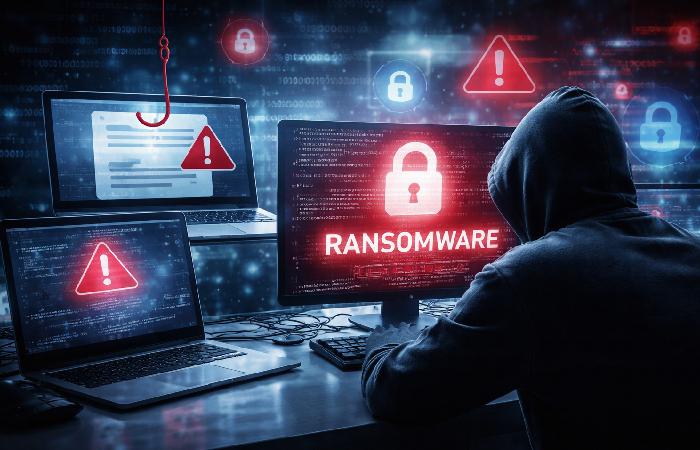
Understanding the threat landscape helps you prioritise defences. Here are the four most dangerous categories:
Ransomware and Extortion Attacks
Ransomware encrypts your files and demands payment for the decryption key. Modern variants also steal data first, threatening to leak it publicly if you do not pay — a tactic called double extortion.
Ransomware is now a multi-stage business model. Criminal groups offer “ransomware-as-a-service,” lowering the entry barrier for attackers.
Phishing and Social Engineering
Phishing remains the #1 initial attack vector. Attackers send emails, texts, or messages that impersonate trusted contacts to trick employees into clicking malicious links or revealing credentials.
AI has made phishing dramatically harder to detect. Attackers now generate nearly perfect impersonations of executives, vendors, and even IT support.
Insider Threats and Human Error
According to the World Economic Forum, 95% of cybersecurity breaches involve human error. This includes:
- Clicking on phishing links
- Using weak or reused passwords
- Misconfiguring cloud storage (leaving data publicly accessible)
- Sharing credentials
Not every insider threat is malicious. Most are simply mistakes — but the damage is the same.
AI-Powered Attacks: The New Frontier
AI is both the cure and the disease for business IT security. Attackers now use AI to:
- Automate reconnaissance — scanning for vulnerabilities at scale
- Craft hyper-personalised phishing — using scraped social media data
- Generate deepfake voice and video — impersonating executives in real time
- Accelerate exploit development — reducing the window between vulnerability disclosure and attack
This is the defining threat shift of 2026. Businesses that do not account for AI-powered attacks are preparing for yesterday’s war.
If you do not have in-house expertise, partnering with a trusted provider such as business IT support Melbourne or a similar local specialist can help you assess your current exposure and close critical security gaps.
Core Components of a Business IT Security Strategy
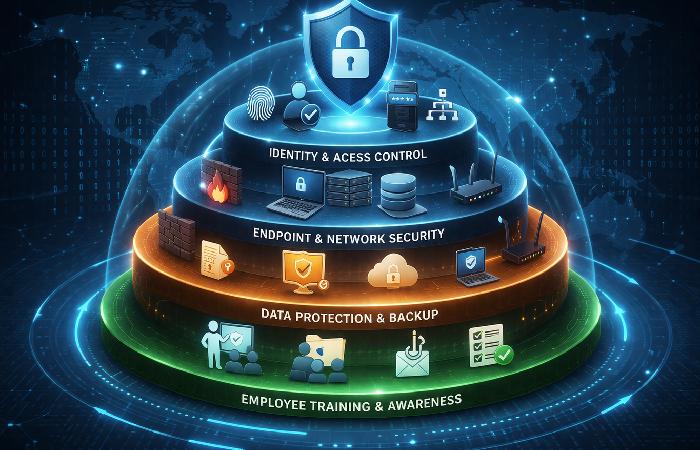
No single tool provides complete protection. Effective business IT security uses layered defences — often called “defense in depth.”
Security Layers by Business Size
| Component | Small Business (1–50) | Mid-Market (50–500) | Enterprise (500+) |
|---|---|---|---|
| Firewall | Basic / cloud-managed | Next-gen firewall (NGFW) | NGFW + micro-segmentation |
| Endpoint Protection | Antivirus + basic EDR | Full EDR / XDR platform | XDR + SOC integration |
| Access Control | MFA + password manager | MFA + SSO + role-based access | Zero Trust Architecture |
| Data Backup | Cloud backup (automated) | 3-2-1 backup strategy | Air-gapped + immutable backups |
| Monitoring | Basic log review | SIEM (cloud-based) | 24/7 SOC / managed detection |
| Training | Annual awareness training | Quarterly training + phishing sims | Continuous + role-specific training |
Network Security (Firewalls, IDS/IPS, VPNs)
Your network perimeter is the first line of defence. Key elements include:
- Firewalls — filter incoming and outgoing traffic based on rules
- Intrusion Detection / Prevention Systems (IDS/IPS) — monitor for and block suspicious traffic patterns
- VPNs — encrypt connections for remote workers accessing internal systems
Even with cloud adoption, network segmentation matters. Flat networks let attackers move laterally once inside.
Endpoint Protection (EDR / XDR)
Every device that connects to your network is a potential entry point — laptops, phones, tablets, IoT devices.
- EDR (Endpoint Detection and Response) monitors individual devices for suspicious behaviour.
- XDR (Extended Detection and Response) correlates signals across endpoints, email, cloud, and network for faster threat identification.
For businesses with remote or hybrid teams, endpoint protection is non-negotiable.
Identity and Access Management (MFA, Least Privilege)
Multi-Factor Authentication (MFA) is the single highest-impact control most businesses can deploy today. It requires users to verify identity with two or more factors:
- Something you know (password)
- Something you have (phone, hardware key)
- Something you are (fingerprint, face ID)
Pair MFA with the principle of least privilege — give each employee access only to the systems and data they need for their role. Nothing more.
Data Protection (Encryption, Backup, DLP)
- Encryption — protects data at rest (on drives) and in transit (over networks). Use industry-standard protocols like AES-256 and TLS 1.3.
- Backup — follow the 3-2-1 rule: three copies of data, on two different media types, with one copy stored offsite or in an isolated cloud environment.
- Data Loss Prevention (DLP) — tools that monitor and prevent sensitive data from leaving the organisation through email, uploads, or USB drives.
Backups are your last line of defence against ransomware. But here’s the issue — if backups are connected to your main network, ransomware can encrypt them too. Isolated or immutable backups are essential.
Employee Security Awareness Training
No firewall can stop an employee from clicking a phishing link. Training must be:
- Regular — quarterly at minimum, not just annual
- Practical — simulated phishing exercises, not just slide decks
- Role-specific — finance teams face different threats than developers
The goal is not to blame employees. It is to build reflexes.
How to Build Your IT Security Plan — Step by Step
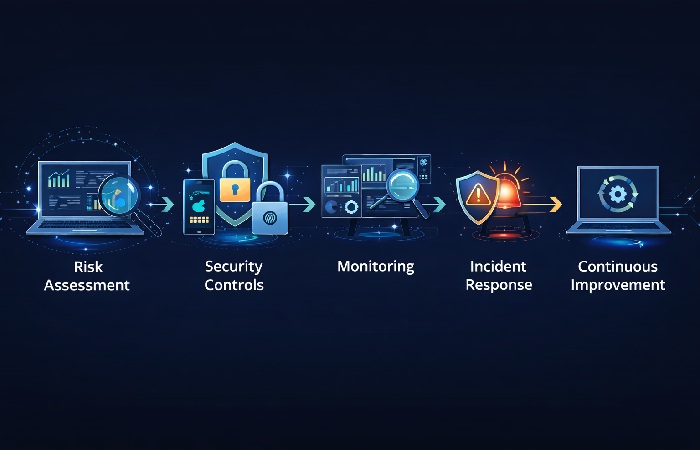
This is where most guides fall short. Here is a practical, five-step implementation sequence based on the NIST Cybersecurity Framework:
Step 1 — Conduct a Risk Assessment
Before buying tools, understand what you are protecting and what threatens it.
- Inventory all assets — hardware, software, data, cloud services
- Identify threats — which attack types are most likely for your industry?
- Assess vulnerabilities — outdated software, weak passwords, unpatched systems
- Rank risks by impact and likelihood — focus resources on the highest-risk items first
- If you do not have internal security expertise, working with a dedicated development team of IT specialist or a similar security-focused partner can help you identify vulnerabilities and design realistic mitigation steps.
A formal risk assessment does not have to be expensive. Free frameworks like NIST and CIS Controls provide structured starting points.
Step 2 — Implement Foundational Controls
Start with the controls that block the most attacks for the least cost:
- Enable MFA on all accounts — email, cloud services, VPN, admin panels
- Deploy automated backups with at least one offsite/isolated copy
- Update and patch all systems — enable automatic updates where possible
- Install endpoint protection on every device
- Secure your Wi-Fi — WPA3, strong passwords, separate guest networks
These five actions close the door on the majority of common attacks.
Step 3 — Deploy Monitoring and Detection
You cannot defend against what you cannot see.
- Set up log collection from critical systems (firewalls, servers, cloud services)
- Consider a cloud-based SIEM for centralised alert management
- For mid-market businesses, a managed detection and response (MDR) provider can offer 24/7 coverage without building an internal SOC
Step 4 — Create an Incident Response Plan
When — not if — an incident occurs, you need a documented plan:
- Detection — who monitors alerts and escalates?
- Containment — how do you isolate affected systems?
- Eradication — how do you remove the threat?
- Recovery — how do you restore from backups and return to normal operations?
- Lessons learned — what failed and how do you prevent recurrence?
Test the plan with a tabletop exercise at least annually.
Step 5 — Review, Test, and Improve Continuously
IT security is not a one-time project. Schedule:
- Quarterly vulnerability scans
- Annual penetration testing (for mid-market and above)
- Ongoing employee training and phishing simulations
- Regular policy reviews as your business, tools, and regulations change
Continuous improvement is what separates companies that get breached and recover from those that get breached and collapse.
Business IT Security Budget: How Much Should You Spend?
Budget Benchmarks by Company Size
| Company Size | Typical IT Security Spend (% of IT Budget) | Annual Range |
|---|---|---|
| Small (1–50 employees) | 6–10% | $5,000 – $50,000 |
| Mid-Market (50–500) | 10–14% | $50,000 – $500,000 |
| Enterprise (500+) | 12–18% | $500,000 – $5M+ |
These are general benchmarks and reflect typical ranges many SMBs use for planning. Regulated industries (healthcare, finance, defence) typically spend at the higher end.
Where to Invest First (Maximum ROI Priorities)
If your budget is limited, prioritise in this order:
- MFA and access control — highest impact per dollar
- Automated backups — cheapest ransomware insurance
- Employee training — addresses the #1 vulnerability (human error)
- Endpoint protection — covers every device on your network
- Monitoring / SIEM — visibility drives everything else
That sounds good — until you try to do everything at once. Start with items 1–3. They require relatively low investment and block the most common attack paths.
Common IT Security Mistakes Businesses Make
- Assuming “we’re too small to be a target” — Small businesses are targeted precisely because of weaker defences.
- Buying tools without a strategy — Technology alone does not equal security. Tools need configuration, monitoring, and trained people.
- Neglecting software updates — Unpatched vulnerabilities are one of the easiest entry points for attackers.
- Using the same password everywhere — One compromised credential can unlock every system.
- Skipping incident response planning — Without a plan, breach response is chaotic, slow, and far more expensive.
- Treating security as an IT-only responsibility — Security is a business-wide concern. Leadership must set the tone.
- Relying on cyber insurance alone — Insurance often requires baseline controls to be in place. Without them, claims can be denied. CISA’s small business cybersecurity resources provide a solid starting checklist.
Who Needs Business IT Security (and Who Can Wait)
Best for:
- Any business storing or processing customer data (PII, payment info, health records)
- Companies in regulated industries (healthcare, finance, e-commerce, defence contracting)
- Businesses with remote or hybrid teams
- Organisations using cloud-based tools and SaaS platforms
Not for:
- Pre-digital sole proprietors with no customer data, no connected systems, and no online presence
In practice, nearly every modern business handles some form of digital data. If you accept payments, send emails, or store customer records, business IT security applies to you.
Final Verdict — Start With the Basics, Then Build
Business IT security does not require a massive budget or a team of specialists on day one. It requires a clear plan, consistent execution, and a culture that treats security as everyone’s job.
Start with the foundational controls: MFA, backups, updates, endpoint protection, and employee training. These five actions alone block the vast majority of common attacks.
Then build outward — add monitoring, formalise incident response, and review continuously. Security is a journey, not a destination.
The cost of doing nothing is almost always higher than the cost of getting started.
Frequently Asked Questions
Q: What is business IT security?
A: Business IT security is the practice of protecting a company’s digital systems, networks, and data from unauthorized access, cyberattacks, and data loss. It includes tools like firewalls, encryption, and MFA, as well as policies around employee training and incident response.
Q: What are the most common cyber threats for businesses?
A: The most common threats are phishing and social engineering, ransomware, insider threats caused by human error, and increasingly, AI-powered attacks. Phishing remains the #1 initial attack vector across all business sizes.
Q: How much does IT security cost for a small business?
A: Most small businesses spend 6–10% of their IT budget on security, which translates to roughly $5,000–$50,000 per year. Costs depend on business size, industry, regulatory requirements, and the complexity of the IT environment.
Q: What is the difference between IT security and cybersecurity?
A: IT security covers the entire IT environment — hardware, software, networks, and physical infrastructure. Cybersecurity focuses specifically on defending against digital threats delivered via the internet. In practice, the two overlap almost completely for most businesses.
Q: What is the first step to securing my business IT?
A: Start with a risk assessment. Inventory your assets, identify threats, assess vulnerabilities, and rank risks by impact. Then implement foundational controls: MFA, automated backups, software updates, and endpoint protection.
Q: Do small businesses need cybersecurity?
A: Yes. Small businesses are among the fastest-growing targets for cyberattacks because they often have weaker defences. Approximately 60% of small businesses that experience a major breach close within six months. Basic protections like MFA and backups are affordable and essential.