


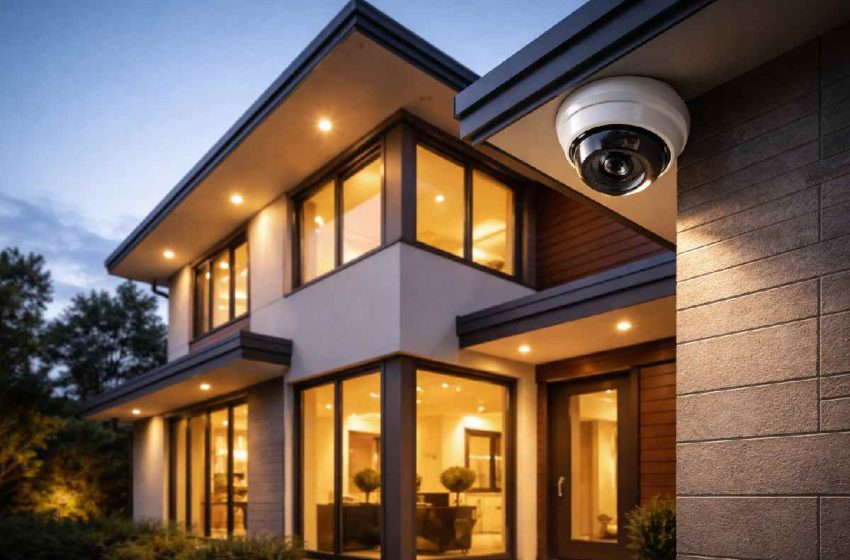
How to Choose Security Cameras for Home (2025 Guide)
A burglary occurs roughly every minute in the United States, according to recent summaries of FBI crime data. According to FBI‑based summaries, there were roughly 779,542 burglaries in 2024 — and homes without a security system are often reported as significantly more likely to be targeted in recent U.S. burglary statistics. More telling, offender research suggests that around 83% of convicted burglars say they actively check for the presence of cameras or alarms before attempting a break‑in, according to surveys on how burglars respond to home security systems and alarms.
Knowing how to choose security cameras for home security purposes is no longer a luxury decision. It is a practical one. But with hundreds of models across dozens of brands, the buying process can quickly become confusing.
This guide cuts through the noise. Whether you’re a homeowner building a full surveillance system or a renter looking for a no‑drill setup, it walks you through types, features, placement, storage, cybersecurity, and total cost so you make the right call the first time.
Table of Contents
At a Glance: How to Choose Home Security Cameras
-
Start with your entry points: front door, back door, and garage.
-
Decide whether wired (owners) or wireless (renters) fits your situation.
-
Choose storage: cloud for convenience, local or hybrid for control and lower long-term cost.
-
Aim for at least 1080p resolution, solid night vision, and reliable motion detection.
-
Set a 2-year budget that includes both hardware and any subscriptions.
What to Know Before You Buy Home Security Cameras
Before you dive into brands and specs, you need to decide:
-
Where you need coverage (indoor, outdoor, or both).
-
Whether a wired or wireless setup fits your living situation.
-
How you want to store footage: cloud, local, or a hybrid of both.
How Security Cameras Actually Deter Crime
Security cameras work through two primary mechanisms: visible deterrence and evidence documentation.
When a potential intruder spots a camera, the risk-reward calculation shifts. Most burglaries are crimes of opportunity — not planned operations. A visible camera signals that the home is monitored and that the risk of identification is high. Studies and surveys of convicted burglars consistently show that the presence of cameras causes them to move on to an easier target.
The second mechanism — evidence collection — matters when deterrence fails. Recorded footage increases the chance of identification and prosecution, which is why camera quality and storage reliability matter just as much as placement.
What Security Cameras Cannot Do (Realistic Expectations)
Cameras are one layer of a broader security strategy. They do not physically stop an intruder, and most burglaries last only 8–10 minutes. Cameras work best when combined with strong locks, motion-sensor lighting, and smart home alerts that let you react quickly.
Homeowner vs Renter — Key Differences Before You Buy
This distinction matters enormously and is overlooked by most buying guides.
Homeowners can install wired systems, mount cameras with permanent hardware, and invest in NVR-based systems for long-term reliability.
Renters need to think differently. Drilling into walls or running cables through a rented property may violate a lease. Renters should look for battery-powered wireless cameras, adhesive or magnetic mounts, and systems that are easy to remove and reinstall. Options like Eufy SoloCam, Arlo Go, and Blink Outdoor are specifically designed with this in mind.
Types of Security Cameras for Home Security
A home security camera system combines different camera types—indoor, outdoor, doorbell, and specialty cameras—to cover entry points, open areas, and key interior spaces.
Not all cameras serve the same purpose. Choosing the wrong type is one of the most common buying mistakes.
| Camera Type | Best For | Avg Price Range | Key Limitation |
|---|---|---|---|
| Indoor Camera | Living rooms, nurseries, entryways | $25 – $100 | Not weatherproof |
| Outdoor Camera | Driveways, backyards, entry points | $50 – $250 | Requires mounting point |
| Doorbell Camera | Front door monitoring | $80 – $250 | Limited field of view |
| Floodlight Camera | Dark areas, deterrence | $150 – $300 | Higher power draw |
| PTZ Camera | Large outdoor areas | $100 – $400 | Complex setup |
| Battery-Powered Camera | Renters, flexible placement | $40 – $200 | Requires recharging |
Indoor Security Cameras
Indoor cameras are compact, designed for interior spaces, and typically less expensive. They are ideal for monitoring living areas, hallways, and entry points from the inside. Many include two-way audio, useful for communicating with family members or pets.
Best for: Monitoring children, pets, and indoor activity while away from home.
Not for: Anyone who needs weatherproof outdoor coverage.
Example: Monitoring your living room and front entry from your phone while you’re at work.
Outdoor Security Cameras
Outdoor cameras are weather-resistant and built for exterior conditions. They typically cover driveways, backyards, side entrances, and garages. For home security purposes, outdoor cameras serve as the first visible deterrent.
Look for an IP65 or IP67 weather resistance rating (explained in the Features section below).
Best for: Monitoring all exterior entry points and perimeter coverage.
Not for: Renters without permission to mount external hardware.
Example: Covering your driveway, garage door, and backyard gate with one or two cameras.
Doorbell Cameras
Video doorbells replace or supplement your existing doorbell and provide a camera view of whoever approaches the front door. They are among the most popular entry-level home security camera options because of their ease of installation and specific use case.
Best for: Front door monitoring, package theft prevention, and visitor identification.
Not for: Wide-area coverage — their FOV is typically narrower than dedicated outdoor cameras.
Example: Watching for package deliveries and seeing who is at the door before you open it.
Floodlight Cameras
Floodlight cameras combine a high-lumen light with a camera. When motion is detected, the light activates and illuminates the area while recording. This is both a deterrent and a visibility tool for dark areas of a property.
Best for: Driveways, garages, and dark backyard corners.
Not for: Budget buyers — these are among the pricier options.
Example: A floodlight camera above your driveway that turns on bright lights and records video whenever it detects motion at night.
PTZ (Pan-Tilt-Zoom) Cameras
PTZ cameras can be remotely controlled to pan horizontally, tilt vertically, and zoom in on specific areas. They are useful for large outdoor spaces where you want flexible coverage without multiple fixed cameras.
Best for: Large properties with wide-open outdoor areas.
Not for: First-time buyers — setup and positioning require more technical effort.
Example: A battery-powered camera on a magnetic mount you can move between the balcony, front door, or rented parking spot without drilling or running cables.
Wired vs Wireless Security Cameras — Which Is Right for You?
This is the most important structural decision you will make when choosing a home security camera system.
How Wired Cameras Work
Wired cameras connect to a central recording unit (NVR or DVR) via Ethernet or coaxial cable. Power is delivered either through a separate power adapter or via PoE (Power over Ethernet), which sends both data and power through a single cable.
How Wireless Cameras Work
Wireless cameras connect to your home Wi-Fi network and transmit footage to cloud storage or a local hub. They are powered either by a wall adapter or rechargeable batteries.
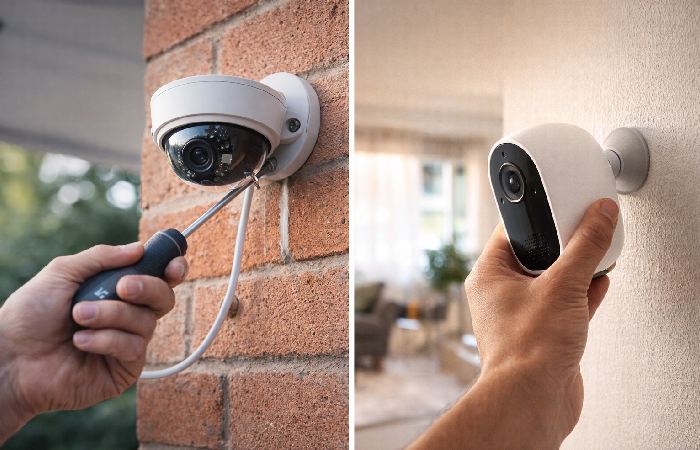
Wired cameras offer the most reliable, long-term setup for homeowners who can run cables and want uninterrupted recording. Wireless cameras prioritize easy installation and flexibility, making them ideal for renters and DIY setups.
Side-by-Side Comparison
| Factor | Wired | Wireless |
|---|---|---|
| Reliability | ✅ Very high — no signal drops | ⚠️ Dependent on Wi-Fi strength |
| Installation | ❌ Complex — requires cable runs | ✅ Simple — plug and connect |
| Best for | Homeowners with long-term plans | Renters or flexible setups |
| Power source | Constant — no battery changes | Battery or adapter |
| Internet outage | ✅ Continues recording locally | ❌ May lose remote access |
| Cost | Higher upfront | Lower upfront, possible subscription |
Decision Framework — When to Choose Which
- Choose wired if you own your home, want the most reliable long-term setup, and are comfortable with a one-time installation process.
- Choose wireless if you rent, want easy installation, plan to move the cameras over time, or are starting with a smaller setup that may grow.
Key Features to Look for When Choosing a Home Security Camera
Video Resolution — What You Actually Need
Resolution determines how much detail is captured. For most home security purposes, 1080p Full HD is the practical minimum. It provides enough clarity to identify faces and license plates under good lighting.
- 2K (2560×1440) offers noticeably sharper detail and is recommended if you want to zoom in on footage after recording without losing clarity.
- 4K cameras deliver the sharpest footage but require more storage space and a compatible NVR. Unless you are covering a very large area or need extreme zoom capability, 1080p or 2K is sufficient for most homes.
Night Vision and Color Night Vision
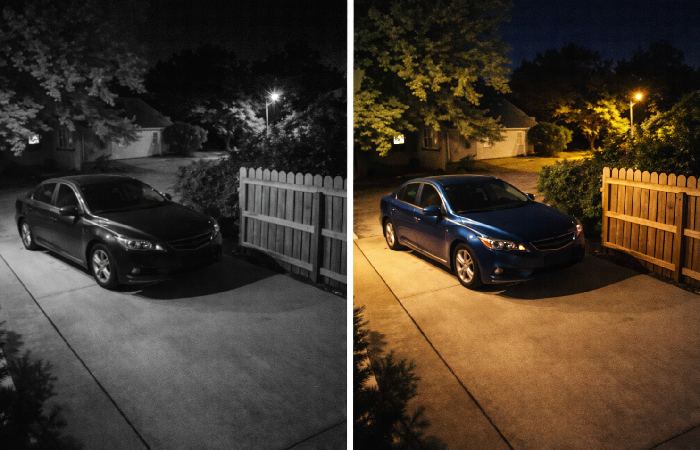
Standard night vision uses infrared (IR) LEDs to illuminate the area in black and white. Most cameras offer 20–40 feet of IR night vision range — look for at least 30 feet for outdoor use.
Color night vision uses a combination of IR and ambient light (or a built-in spotlight) to produce color footage at night. This is significantly more useful for identifying clothing colors, vehicle colors, and faces. If budget allows, color night vision is worth the upgrade for outdoor cameras.
Field of View — Why Angle Matters
Field of view (FOV) determines how wide an area a camera can capture. A narrow FOV (70–90°) covers a focused zone, while a wide FOV (110–130°+) covers broader areas with a single camera.
For entry points like doorways, a 100–130° FOV is typically ideal. For open areas like driveways or backyards, look for 130°+ or consider a PTZ camera.
A wider FOV reduces the total number of cameras you need — which lowers your overall system cost.
Motion Detection — Standard vs AI-Powered
Standard motion detection triggers on any movement within the camera’s view — including animals, tree branches, or passing cars. This generates a high volume of false alerts.
AI-powered motion detection uses software algorithms to distinguish between people, vehicles, packages, and animals. This dramatically reduces false alerts and ensures you only get notified when it actually matters.
Cameras with person detection include Arlo Pro 4, Google Nest Cam, and Eufy models with on-device AI. Some require a subscription for AI features; others process detections locally for free.
Weather Resistance — Understanding IP Ratings
For any outdoor camera, check the Ingress Protection (IP) rating:
- IP65: Protected against dust and low-pressure water jets from any direction. Suitable for most outdoor environments.
- IP66: Stronger water protection — handles heavier rainfall.
- IP67: Protected against temporary submersion in water. Ideal for areas prone to heavy rain or flooding.
Do not install an indoor-only camera outdoors, even under a covered area. Temperature extremes and humidity will degrade performance and shorten the camera’s lifespan.
Two-Way Audio
Two-way audio allows you to speak through the camera via a connected app. This is useful for communicating with delivery drivers, guests, or deterring a potential intruder verbally before calling authorities.
Most modern cameras include this feature, but audio quality varies significantly. Look for cameras with noise-canceling microphones if you plan to use this feature regularly.
Frame Rate — Why It Matters
Frame rate is measured in frames per second (fps). At 15fps, footage looks slightly choppy but captures motion adequately. At 30fps, footage is smooth and much easier to analyze.
For security purposes, 30fps is the recommended standard. Footage recorded at 15fps can make it harder to identify a fast-moving subject accurately.
Cloud Storage vs Local Storage — The Hidden Cost Nobody Talks About
This is one of the most under-discussed decisions in the security camera buying process. The camera price is not the total cost.
Cloud Storage: Convenience and Ongoing Cost
How Cloud Storage Works and What It Really Costs
Cloud storage sends your footage to the manufacturer’s servers, which you access through an app. It is convenient and accessible from anywhere, but it comes with ongoing subscription fees.
Most free plans store only 24–72 hours of footage, cover only 1–2 cameras, and limit clip length. Paid plans typically range from $3 to $15 per camera per month, which adds up quickly across a multi-camera system.
Over two years, a subscription plan can cost significantly more than the camera itself.
Independent security and privacy groups regularly highlight this trade-off between convenience and long-term cost, especially when evaluating systems that rely heavily on cloud-based smart home devices.
Local Storage: Control and Upfront Cost
Local Storage Options
Local storage keeps footage on-site — typically on a microSD card inside the camera, or on a centralized NVR/DVR connected to multiple cameras.
- microSD card: Simple and low-cost. 32GB to 256GB cards are common. Limited by card capacity and vulnerability to theft (if the camera itself is stolen).
- NVR (Network Video Recorder): Used with IP cameras. Connects via Ethernet. Higher quality recording with expandable storage via hard drives.
- DVR (Digital Video Recorder): Used with analog cameras. Connects via coaxial cable. An older standard, though still widely used.
Storage Type Comparison
| Storage Type | Monthly Cost | Remote Access | Risk | Best For |
|---|---|---|---|---|
| Cloud | $3 – $15/camera | ✅ Yes | Server outage, data privacy | Casual users, renters |
| microSD | $0 (card cost only) | ❌ Limited | Card theft, failure | Budget buyers |
| NVR/DVR | $0 (hardware only) | ✅ With setup | Hardware failure | Long-term homeowners |
| Hybrid | Low | ✅ Yes | Minimal | Best value overall |
Hybrid systems — which store locally and back up critical clips to the cloud — offer the best balance of reliability, accessibility, and cost.
Smart Home Compatibility — Does Your Camera Work With Your Ecosystem?
If you already use smart home devices, camera compatibility matters more than most buyers anticipate.
- Amazon Alexa: Supports Ring, Blink, Wyze, and many others. You can view camera feeds on Echo Show displays.
- Google Home / Google Assistant: Works natively with Google Nest Cam and supports select third-party brands.
- Apple HomeKit: Supports a smaller range of cameras (Logitech Circle, Eufy, Arlo) but offers strong privacy features — footage is processed on-device rather than in the cloud in many cases.
If you are building a smart home ecosystem, choose a camera that integrates with your existing hub. Mixing ecosystems (e.g., Alexa for lights, HomeKit for cameras) often creates a fragmented experience.
What happens if your internet goes down? Wireless cameras relying solely on cloud storage will lose remote access. Cameras with local SD card or NVR backup continue recording even without internet — an important consideration for reliability.
How Many Security Cameras Does a Home Actually Need?
| Home Type | Minimum Cameras | Recommended | Key Coverage Focus |
|---|---|---|---|
| Apartment / Studio | 1–2 | 2–3 | Front door and main living area |
| Small home (2 bed) | 2–3 | 4 | Front and back doors, hallway or main living space |
| Medium home (3–4 bed) | 3–4 | 5–6 | Front door, back door, garage, main interior area |
| Large home (4+ bed) | 4–5 | 6–8 | All entry doors, driveway, key interior/high-value rooms |
These numbers assume cameras are placed strategically at entry points and key areas. More cameras do not automatically mean better security — correct placement is more important than quantity.
Best Camera Placement for Home Security Purposes
Front Door and Entry Points
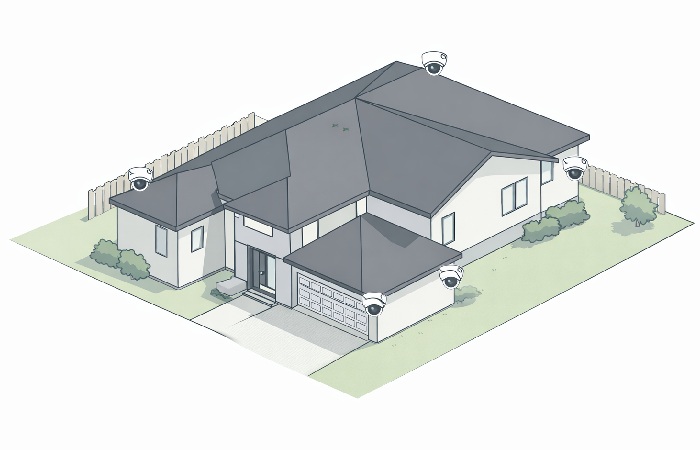
The front door is the most common entry point — 34% of burglars enter homes via the front door. A camera covering the full front approach, not just the door itself, is ideal. Mount at 8–10 feet height for a clear face-level angle.
Backyard and Side Entrances
22% of burglars gain entry through the back door. Side gates and back doors are common secondary targets. Place cameras to cover the full length of the backyard and any gate access points.
Garage and Driveway
Garages are frequently targeted for tool theft and vehicle break-ins. A wide-angle camera positioned to cover the full driveway and garage door is essential for most homes.
Indoor Placement Best Practices
For indoor cameras, focus on main entry points (front door interior, back door), common areas (living room), and any rooms with high-value items. Position cameras high in corners for maximum coverage.
Where NOT to Place Security Cameras
- Bathrooms, bedrooms, or any private area where filming could be a legal issue
- Directly facing a neighbor’s yard or window (a legal risk in many US states)
- Areas where sun glare or backlighting will wash out the image
- Locations where the camera is easily accessible and can be physically removed by an intruder
Security Camera Privacy Laws and Legal Considerations
This is one of the most overlooked areas when purchasing security cameras for home security purposes — and one of the most important.
Can You Record Your Neighbors or Public Spaces?
In the US, recording in areas where there is no reasonable expectation of privacy — such as the public street or your own driveway — is generally legal. However, consistently recording a neighbor’s backyard, window, or private spaces can constitute a privacy violation and may expose you to civil liability.
Always point cameras toward your own property. If a camera’s field of view inadvertently captures a neighbor’s property, angle it downward or use privacy masking features available in most modern camera apps.
Do You Need to Disclose Indoor Cameras to Guests?
Laws vary by state. In most US states, recording video in common areas of your home without notifying guests is legal. However, recording audio in a conversation without consent may violate wiretapping laws in two-party consent states, including California, Florida, and Illinois. If your camera includes two-way audio, be aware of your state’s recording consent laws.
Outside the United States, privacy and recording laws can differ significantly, so always review local regulations before installing cameras or recording audio.
To get a neutral, high-level view before speaking with a lawyer, it’s worth scanning an overview of security camera and CCTV privacy laws so you understand the main principles around public versus private spaces.
Brief Overview of Key US Considerations
- One-party consent states: Recording audio of conversations you are part of is generally permitted.
- Two-party consent states (approx. 13 states): All parties in a recorded conversation must consent to being recorded.
- HOA rules: Some homeowner associations have restrictions on visible exterior cameras — check before installing.
When in doubt, consult a local attorney, especially for commercial properties or multi-unit buildings.
How to Protect Your Security Cameras From Being Hacked
IP cameras connect to your network — and like any networked device, they are a potential attack surface. This is a growing concern that most buying guides fail to address adequately.
Most of the core steps you’ll take here mirror what consumer protection agencies recommend in their own guidance on how to secure your home security cameras.
Why IP Cameras Are Vulnerable
Cameras with default passwords, outdated firmware, or no encryption are the most common targets. Hackers use automated tools to scan networks for exposed camera feeds — some incidents have involved cameras being accessed remotely and used to spy on households.
5 Steps to Secure Your Camera System
- Change the default password immediately and use a unique, strong password of at least 12 characters.
- Keep firmware updated so security patches are applied as soon as the manufacturer releases them.
- Enable two-factor authentication (2FA) on your camera account and app.
- Place cameras on a separate guest or VLAN network so a compromise doesn’t expose your entire home network.
- Choose brands that use end-to-end encryption and have a track record of prompt security updates.
What to Look for in a Camera’s Cybersecurity Features
When evaluating a camera brand, look for: AES-128 or AES-256 encryption, TLS (Transport Layer Security) for data transmission, a clear data privacy policy, and a history of prompt security patch releases. Brands with documented cybersecurity incidents and slow patch response times should be avoided regardless of price or features.
Budget Guide — How Much Should You Spend?
-
Budget Tier ($30–$80 per camera)
Entry-level cameras in this range typically offer 1080p resolution, basic motion detection, limited cloud storage, and Wi-Fi connectivity. Brands like Wyze and TP-Link Tapo offer surprisingly solid performance at this price. Expect fewer AI features and shorter warranty support.
Best for: Renters, first-time buyers, or anyone covering a single entry point on a tight budget.
-
Mid-Range Tier ($80–$200 per camera)
This is the best value zone for most homeowners. Mid-range cameras typically include 2K or 4K resolution, color night vision, AI-powered motion detection, two-way audio, and strong smart home integration. Brands like Eufy, Arlo, and Ring sit in this category.
Best for: Most homeowners building a 3–6 camera system with a balance of features and reliability.
-
Premium Tier ($200+ per camera)
Premium cameras offer the best image quality, advanced AI features (facial recognition, package detection, vehicle classification), professional build quality, and enterprise-grade encryption. Google Nest, Arlo Ultra, and Lorex professional series operate in this space.
Best for: Large homes, high-value properties, or buyers who want maximum image quality, AI features, and professional-grade hardware.
Total Cost of Ownership — The Number Most Buyers Miss
Before purchasing, calculate your 2-year total cost:
Example setups:
-
Renter setup: 2 wireless battery-powered cameras with basic cloud storage – expect a lower upfront cost but ongoing monthly subscription fees.
-
Homeowner setup: 4 wired PoE cameras with an NVR and no subscription – higher upfront hardware cost but little to no ongoing storage fees.
Camera cost + (Monthly subscription × 24) + Installation (if professional)
A $50 camera with a $10/month cloud subscription costs $290 over two years — more than a $200 camera with free local storage. Always factor in ongoing costs before choosing a camera based on upfront price alone.
Can Home Security Cameras Lower Your Insurance Premium?
Some homeowners insurance providers offer discounts for documented home security measures, including security cameras and monitoring systems. Discounts vary by insurer and policy but typically range from 2% to 15%.
Contact your insurance provider before purchasing to ask whether specific camera brands, professional monitoring, or NVR systems qualify for a premium reduction. In some cases, the discount over time can offset a portion of the system cost.
Common Mistakes to Avoid When Choosing a Home Security Camera
- Buying based on brand recognition alone — major brands dominate marketing but smaller brands often offer better value per feature.
- Ignoring total cost of ownership — subscriptions can cost more than the camera within two years.
- Choosing too narrow a field of view — results in blind spots that reduce coverage efficiency.
- Forgetting to check IP ratings for outdoor cameras — indoor cameras degrade rapidly when exposed to rain or humidity.
- Not securing the camera’s network connection — a camera with a default password is a security vulnerability, not a security asset.
- Over-buying cameras without a placement strategy — more cameras without a plan does not equal better coverage.
Who This Guide Is For
This guide is designed for homeowners and renters who are actively researching their first or upgraded security camera setup. It is particularly useful if you want to understand the technical landscape before committing to a brand, if you are deciding between wired and wireless systems, or if you want to understand long-term costs before purchasing.
Who Should Approach This Cautiously
If you live in a rental with strict lease terms about wall mounting or external hardware, confirm your lease restrictions before purchasing any camera that requires permanent installation. If you live in an HOA, confirm whether exterior cameras are permitted and whether placement restrictions apply.
4-Step Decision Path
-
Map your home: list all exterior doors, driveway/garage, and any high-value interior areas.
-
Choose wired or wireless based on whether you own or rent and how permanent you want the setup to be.
-
Decide on storage: cloud, local NVR/DVR, or a hybrid model based on budget and privacy needs.
-
Set a realistic 2-year budget, then shortlist cameras that match your features, ecosystem, and total cost targets.
Final Verdict — How to Choose Security Cameras for Home Security
Choosing the right security camera for home security purposes comes down to five core decisions:
- Indoor or outdoor? — Define where coverage is needed first.
- Wired or wireless? — Homeowners benefit from wired; renters need wireless flexibility.
- What features matter most? — Prioritize resolution (1080p minimum), night vision, FOV, and AI detection.
- How will footage be stored? — Calculate total 2-year cost before committing to cloud storage.
- What is the complete budget? — Include camera, subscription, and installation costs in your total.
Start with the entry points that matter most — front door, back door, garage — and build from there. A well-placed 3-camera system will outperform a poorly positioned 8-camera setup every time.
Frequently Asked Questions
Q: How many security cameras do I need for my home?
Most homes need between 2 and 6 cameras, depending on size and layout. Focus first on the front door, back door, and garage, then add more only if you still have blind spots.
Q: What is the best security camera for home use without a subscription?
Several cameras offer strong local storage with no monthly fee, including Eufy (with on-device storage), Reolink, and Lorex NVR systems. These store footage on a built-in drive or microSD card, giving you full access without ongoing subscription costs.
Q: Can my neighbor’s security camera legally point at my house?
In many places, it’s legal for a neighbor’s camera to capture anything that’s publicly visible, like streets, driveways, or front yards. It becomes a problem if the camera clearly targets private areas of your home, such as inside windows or a fenced backyard, which may be considered a privacy violation depending on local laws.
Q: How do I stop my security camera from being hacked?
You reduce hacking risk by locking down access and keeping the system updated. Change default passwords, use strong unique passwords and two-factor authentication, keep firmware updated, and place cameras on a separate network or guest/VLAN where possible.
Q: Do home security cameras lower homeowners insurance?
Home security cameras can sometimes earn you a small discount, but it depends on your insurer and policy. Many providers only apply discounts when cameras are part of a broader security package, so it’s best to confirm directly with your insurance company.
Citations & Methodology
This guide uses data and insights from:
-
FBI and other official crime statistics on burglary and property crime
-
Independent lab testing and reviews of home security cameras by Consumer Reports
-
Recent industry reports on the global home security camera market
About Technologyies.com
Technologyies.com publishes practical, easy‑to‑understand content on health, technology, business, marketing, and lifestyle. Articles are based primarily on reputable, publicly available information, with AI tools used only to help research, organize, and explain topics more clearly so the focus stays on real‑world usefulness rather than jargon or unnecessary complexity.
Disclaimer: This article is intended for informational purposes only. Product availability, pricing, and features are subject to change. Always verify current specifications with the manufacturer before purchasing. For legal questions related to camera placement or recording laws, consult a licensed attorney in your jurisdiction.