


Database Design: Guide to Efficient Databases
A poorly designed database does not announce itself. It shows up months later as duplicate records, sluggish queries, and reports that contradict each other. By then, fixing the schema costs far more than building it right the first time.
Database design is the structured process of organizing data into tables, defining how those tables relate to each other, and enforcing rules that keep information accurate, consistent, and fast to retrieve. Whether you are building a startup MVP or scaling an enterprise system, the principles remain the same.
This guide walks you through the complete database design process — from gathering requirements to choosing the right tools. It is written for developers, CS students, database administrators, and business analysts who want a practical, no-fluff reference they can actually use.
Table of Contents
Key Takeaways
- What is database design? → The process of structuring data into tables with defined relationships and constraints to ensure accuracy and efficiency
- Why does it matter? → Prevents redundancy, maintains data integrity, and enables applications to scale without breaking
- What are the steps? → Requirements Analysis → Conceptual Design → Logical Design → Physical Design
- Relational or NoSQL? → Relational for structured, transactional data; NoSQL for flexible, document-based workloads
- Biggest mistake to avoid? → Skipping normalization — it creates data anomalies that compound over time and become expensive to fix
What Is Database Design?
Database Design Definition
Database design is the process of planning and structuring a database so that data is stored efficiently, retrieved quickly, and maintained accurately over time. It involves creating a blueprint that defines tables, columns, relationships, keys, and constraints — all organized to minimize redundancy and protect data integrity.
The foundation of modern relational database design traces back to Edgar F. Codd’s relational model, first published by IBM in 1970. That model introduced the idea of organizing data into relations (tables) governed by mathematical set theory — a concept that still underpins every major RDBMS today.
Why Database Design Matters
A well-designed database does three things that a poorly designed one cannot:
- Eliminates redundancy. Storing the same data in multiple places wastes storage and creates inconsistencies when one copy gets updated but others do not.
- Enforces data integrity. Constraints like primary keys, foreign keys, and check rules ensure that invalid or contradictory data never enters the system.
- Supports scalability. Clean schema structures make it straightforward to add new features, tables, or relationships without rewriting existing logic.
Poor data quality costs organizations millions of dollars every year, according to widely cited Gartner research. Much of that cost traces back to schema-level problems — not bad queries, but bad structure. A query can be optimized in minutes. A flawed schema takes weeks to refactor once production data depends on it.
The Database Design Process (Step-by-Step)
Every database design project follows four stages. Skipping any stage increases the risk of costly rework later.
Step 1 — Requirements Analysis
Before drawing a single diagram, answer these questions:
- What problem does this database solve? Define the business purpose clearly.
- Who will use it? Identify the end users — application code, reporting dashboards, analytics pipelines.
- What data needs to be stored? List every piece of information the system must track.
- What questions must the data answer? Start with the queries, not the tables. This requirement-first approach prevents building structures nobody needs.
Write requirements down. Even a one-page document prevents scope creep and miscommunication.
Step 2 — Conceptual Design (ER Modeling)
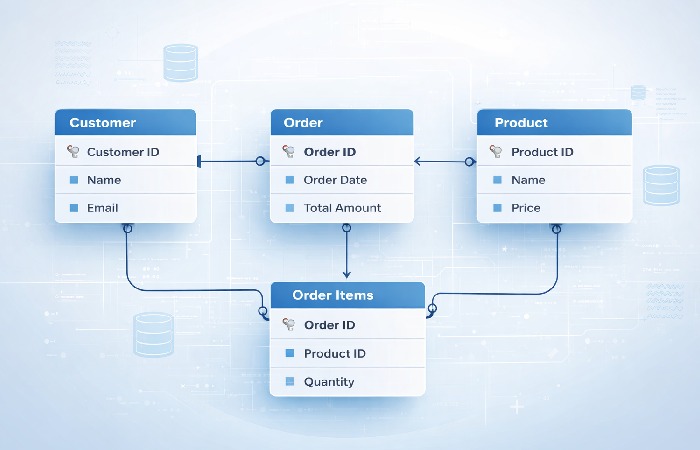
Conceptual design translates requirements into a visual model. The most widely used tool is the Entity-Relationship (ER) diagram.
An ER diagram identifies three things:
- Entities — The real-world objects you need to store (e.g., Customer, Product, Order)
- Attributes — The properties of each entity (e.g., Customer has name, email, phone)
- Relationships — How entities connect to each other (e.g., a Customer places many Orders)
At this stage, you are not thinking about SQL syntax, data types, or indexing. You are mapping out what exists and how it connects. Keep it abstract.
Step 3 — Logical Design (Tables, Keys, Relationships)
Logical design transforms the ER diagram into a structured schema:
- Entities become tables. Each entity maps to one table.
- Attributes become columns. Each property becomes a column with a defined data type.
- Primary keys are assigned. Every table gets a column (or column set) that uniquely identifies each row.
- Foreign keys link tables. Relationships from the ER diagram become foreign key constraints that enforce referential integrity.
- Normalization is applied. Tables are restructured to eliminate redundancy (more on this below).
The logical design is platform-agnostic. It defines structure without committing to a specific DBMS.
Step 4 — Physical Design (Indexing, Storage, DBMS Selection)
Physical design maps the logical schema onto a specific database system — MySQL, PostgreSQL, SQL Server, Oracle, or MongoDB.
Key decisions at this stage:
- Data types. Choose appropriate column types (VARCHAR vs. TEXT, INT vs. BIGINT).
- Indexing. Add indexes on frequently queried columns to accelerate reads. A B-tree index, the most common type, organizes values in a sorted tree structure so the database can locate rows in logarithmic time instead of scanning every row.
- Partitioning. For large tables, horizontal partitioning splits data across segments based on a key (e.g., date range).
- Storage engine. InnoDB (MySQL) vs. MyISAM, or PostgreSQL’s heap storage with TOAST for large objects.
- Replication and backup. Decide how data gets copied for redundancy and disaster recovery.
Core Concepts Every Designer Must Know
Tables, Rows, and Columns
A table (also called a relation) holds data about one subject — customers, orders, products. Each row (record) is one instance. Each column (field) is one attribute. A well-designed table stores data about exactly one entity.
Primary Keys and Foreign Keys
- A primary key uniquely identifies every row in a table. It must be unique and never null. Common choices include auto-incrementing integers or UUIDs.
- A foreign key is a column in one table that references the primary key of another table. It creates a link between the two tables and enforces referential integrity — you cannot insert an order referencing a customer that does not exist.
Table Relationships
There are three types of relationships between tables:
| Relationship | Description | Example |
|---|---|---|
| One-to-One | One record in Table A maps to exactly one record in Table B | User → User Profile |
| One-to-Many | One record in Table A maps to many records in Table B | Customer → Orders |
| Many-to-Many | Multiple records in A relate to multiple records in B (requires a junction table) | Students ↔ Courses |
Many-to-many relationships always require a junction table (also called a bridge or associative table) with foreign keys pointing to both parent tables.
Data Integrity and Constraints
Data integrity rules prevent invalid data from entering the database:
- Entity integrity — Every table has a primary key; no primary key value is null.
- Referential integrity — Foreign keys must reference existing primary key values.
- Domain integrity — Column values must conform to defined data types, ranges, and formats (e.g., an email column must contain valid email syntax).
- User-defined integrity — Business rules enforced through CHECK constraints or triggers (e.g., order quantity must be greater than zero).
Database Normalization Explained
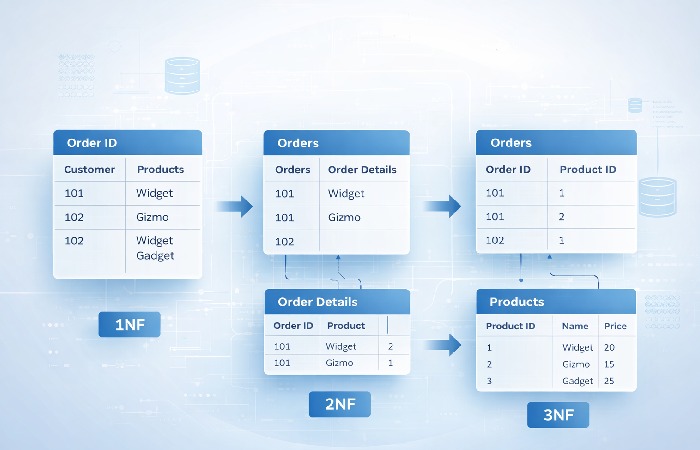
Normalization is the process of reorganizing tables to reduce redundant data and prevent anomalies — specifically insertion, update, and deletion anomalies that occur when the same information is stored in multiple places.
For a deeper walkthrough with Access-specific examples, Microsoft’s database design fundamentals provides a helpful step-by-step reference.
First Normal Form (1NF)
A table is in 1NF when:
- Every column contains atomic (indivisible) values — no lists or sets in a single cell
- Every row is unique (a primary key exists)
Before 1NF:
| OrderID | Products |
|---|---|
| 101 | Laptop, Mouse, Monitor |
After 1NF:
| OrderID | Product |
|---|---|
| 101 | Laptop |
| 101 | Mouse |
| 101 | Monitor |
Second Normal Form (2NF)
A table is in 2NF when:
- It satisfies 1NF
- Every non-key column depends on the entire primary key (no partial dependencies)
This rule matters most for tables with composite primary keys. If a column depends on only part of the key, move it to a separate table.
Third Normal Form (3NF)
A table is in 3NF when:
- It satisfies 2NF
- No non-key column depends on another non-key column (no transitive dependencies)
Example: If an Orders table has CustomerID, CustomerName, and CustomerCity, the name and city depend on CustomerID — not on OrderID. Move them to a Customers table.
When Denormalization Makes Sense
Here is where most guides stop. But the reality is that over-normalizing can hurt performance — especially in read-heavy, analytics-focused workloads.
Denormalization deliberately reintroduces some redundancy to avoid expensive joins. Common use cases:
- Reporting databases where read speed matters more than write consistency
- Data warehouses using star or snowflake schemas
- Caching layers that store precomputed aggregates
The trade-off is clear: denormalization speeds up reads but complicates writes (updates must touch multiple copies). Make this choice deliberately, not by accident.
Database Schema Types Compared
Not every project needs a traditional relational schema. Here is how the major models compare:
| Schema Type | Structure | Best For | Strengths | Weaknesses |
|---|---|---|---|---|
| Relational | Tables with rows and columns linked by keys | Transactional apps, ERP, CRM | Strong consistency, mature tooling, SQL support | Complex joins at scale, rigid schema changes |
| Document (NoSQL) | JSON/BSON documents in collections | Content management, real-time apps, prototyping | Flexible schema, horizontal scaling | Weaker consistency guarantees, no native joins |
| Star Schema | Central fact table surrounded by dimension tables | Data warehousing, BI dashboards | Fast aggregation queries, intuitive structure | Redundancy in dimension tables |
| Snowflake Schema | Normalized star schema with sub-dimension tables | Large-scale analytics, complex hierarchies | Less redundancy than star schema | More joins required, slower queries |
Choosing the Right Model for Your Project
Use this quick decision guide:
- Structured data with complex relationships? → Relational (PostgreSQL, MySQL)
- Rapidly changing requirements or semi-structured data? → Document/NoSQL (MongoDB, DynamoDB)
- Analytics and reporting on large datasets? → Star or Snowflake schema
- Need ACID transactions? → Relational or NewSQL (CockroachDB, Google Spanner)
According to the DB-Engines database ranking, relational systems (Oracle, MySQL, SQL Server, PostgreSQL) continue to dominate enterprise adoption, while MongoDB leads the NoSQL category.
Database Design Tools
You do not need to draw ER diagrams on a whiteboard. These tools help you model, visualize, and generate SQL from your designs:
| Tool | Type | Price | Best For |
|---|---|---|---|
| dbdiagram.io | Browser-based ER tool | Free / Pro from $9/mo | Quick schema prototyping with DSL syntax |
| Lucidchart | Visual diagramming platform | Free tier / Paid from $7.95/mo | Team collaboration and polished ER diagrams |
| MySQL Workbench | Desktop IDE + modeler | Free (open source) | MySQL-specific design, forward/reverse engineering |
| pgModeler | Desktop modeler for PostgreSQL | $25 (one-time) | PostgreSQL-specific modeling and DDL generation |
| DataGrip (JetBrains) | Multi-DB IDE with visual tools | $24.90/mo | Developers already using JetBrains ecosystem |
For most projects, start with dbdiagram.io for speed, then move to a DBMS-specific tool (Workbench or pgModeler) when you are ready to generate production DDL.
Real-World Database Design Example
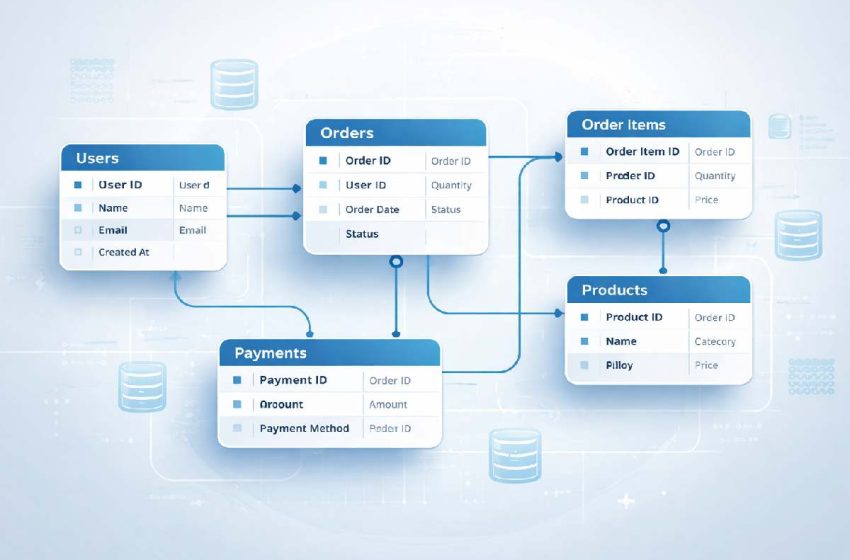
Theory is essential, but seeing it applied makes the concepts stick. Here is a simplified e-commerce database design:
Entities identified: Users, Products, Categories, Orders, Order Items, Payments
Table structure:
| Table | Primary Key | Key Columns | Relationships |
|---|---|---|---|
| users | user_id | name, email, created_at | One-to-Many → orders |
| categories | category_id | name, description | One-to-Many → products |
| products | product_id | name, price, category_id (FK) | Many-to-Many → order_items |
| orders | order_id | user_id (FK), order_date, status | One-to-Many → order_items |
| order_items | item_id | order_id (FK), product_id (FK), quantity, unit_price | Junction table |
| payments | payment_id | order_id (FK), amount, method, paid_at | One-to-One → orders |
Design decisions explained:
- order_items is the junction table that resolves the many-to-many relationship between orders and products. It stores
quantityandunit_priceat the time of purchase — because product prices can change, but the order record should not. - category_id in products uses a foreign key to avoid storing category names repeatedly (normalization in action).
- payments is separated from orders because not every order is paid immediately; separating them supports states like “pending” and “refunded.”
This design satisfies 3NF. Every non-key column depends only on its table’s primary key, and no transitive dependencies exist.
Common Database Design Mistakes to Avoid
- Skipping requirements analysis. Jumping straight into tables without understanding what questions the data must answer leads to constant rework.
- Storing repeated data instead of normalizing. Putting customer names directly in every order row turns a simple name change into a multi-row update nightmare.
- Using meaningless primary keys inconsistently. Mixing auto-increment IDs and natural keys across tables creates confusion. Pick a convention and stick with it.
- Ignoring indexing until performance problems appear. Indexes should be part of the design, not an afterthought. At minimum, index every foreign key column.
- Treating the database as a dumping ground. Resist the urge to add columns “just in case.” Every column should have a clear purpose tied to a requirement.
- Designing for today only. A schema that handles current volume but cannot accommodate 10x growth without a rewrite is not well-designed — it is deferred technical debt.
Who Should Learn Database Design (And Who Can Skip It)
Best for:
- Backend developers — You write the queries and build the APIs. Understanding schema design prevents performance problems before they reach production.
- Data engineers and DBAs — Schema design is your core skill. Deep normalization and indexing knowledge is non-negotiable.
- CS students — Database design is a foundational skill tested in courses and interviews alike.
- Startup CTOs / technical co-founders — Early schema decisions shape your entire tech stack. Getting them right saves months of refactoring.
Not for (at this depth):
- Frontend-only developers — A high-level overview is useful, but deep normalization theory is rarely needed in your daily work.
- Non-technical project managers — Understanding tables and relationships at a conceptual level is sufficient. The implementation details are for your engineering team.
Final Verdict
Database design is not optional — it is the invisible architecture that determines whether your application scales smoothly or collapses under its own weight.
The most important takeaway: start with the questions your data must answer, not with the tables. Requirements-first design prevents wasted effort and delivers schemas that serve real business needs.
For most applications, follow the four-stage lifecycle (Requirements → Conceptual → Logical → Physical), normalize to 3NF, and only denormalize where read performance clearly demands it. Use a visual tool to model before you write SQL so stakeholders can review and catch issues early. And always — always — define your keys and constraints explicitly instead of relying only on application code.
Database design is a skill that compounds. Every project you design well makes the next one faster and more intuitive.
Frequently Asked Questions
Q: What is database design in simple terms?
A: Database design is the process of organizing data into structured tables, defining how those tables relate to each other, and setting rules to keep the data accurate and efficient. Think of it as creating a blueprint before building a house — it determines where everything goes and how it connects.
Q: What are the main steps in database design?
A: The four main steps are: (1) Requirements Analysis — understanding what data you need and why, (2) Conceptual Design — creating an ER diagram, (3) Logical Design — defining tables, keys, and relationships, and (4) Physical Design — implementing the schema in a specific DBMS with indexes and storage configuration.
Q: What is normalization and why does it matter?
A: Normalization is the process of restructuring tables to eliminate redundant data and prevent anomalies during insertions, updates, and deletions. It matters because duplicate data leads to inconsistencies — if a customer’s address is stored in five places and updated in only four, your data is now unreliable.
Q: What is the difference between logical and physical database design?
A: Logical design defines the abstract structure — tables, columns, keys, and relationships — without choosing a specific database system. Physical design implements that structure in a real DBMS (like PostgreSQL or MySQL) and adds platform-specific decisions like data types, indexes, partitioning, and storage engines.
Q: What tools are used for database design?
A: Popular tools include dbdiagram.io (browser-based, free), Lucidchart (visual collaboration), MySQL Workbench (free, MySQL-specific), pgModeler (PostgreSQL-specific), and DataGrip (multi-database IDE by JetBrains). Most designers start with a lightweight tool for prototyping and move to a DBMS-specific modeler for production schemas.
Q: Is database design the same as schema design?
A: Not exactly. Database design is the broader process that includes requirements analysis, conceptual modeling, and decision-making about structure and relationships. Schema design is one part of that process — specifically the step where you define the actual tables, columns, data types, and constraints. Schema design is the output; database design is the full journey.