



Cloud Computing Applications: Examples & Types (2026)
The shift from on-premise software to cloud-based solutions has fundamentally transformed how businesses operate, collaborate, and scale. Cloud computing applications are software programs that run on remote servers and are accessed via the internet, rather than being installed locally on individual devices. They enable on-demand access to computing resources, collaboration tools, and data storage with scalability, cost efficiency, and remote accessibility that traditional infrastructure cannot match.
By 2026, 94% of enterprises globally have integrated cloud applications into their core operations, spanning industries from healthcare to entertainment. This isn’t just about storage—cloud applications power everything from AI-driven analytics to real-time collaboration, streaming services, and mission-critical business systems.
Table of Contents
Quick Answers
- What are cloud computing applications? Software hosted on remote servers, accessed via the internet, offering on-demand resources without local installation.
- Most popular examples? Google Workspace, Salesforce, AWS, Netflix, Slack, Zoom, Shopify, and Dropbox.
- Best for whom? Startups, remote teams, data-heavy industries, and businesses seeking scalability without infrastructure costs.
- Key risks? Vendor lock-in, security vulnerabilities, compliance complexity, and dependency on internet connectivity.
- How to choose? Match service model (SaaS, PaaS, IaaS) to your use case, evaluate compliance needs, and calculate Total Cost of Ownership (TCO).
What Are Cloud Computing Applications?
Cloud computing applications are software solutions delivered over the internet from centralized data centers managed by third-party providers like Amazon Web Services (AWS), Microsoft Azure, and Google Cloud Platform (GCP). Unlike traditional software installed on local machines, cloud applications:
- Run on remote infrastructure (servers, storage, networks) maintained by cloud providers.
- Scale dynamically based on demand without manual hardware provisioning.
- Enable multi-device access from anywhere with an internet connection.
- Receive automatic updates without requiring user intervention.
Cloud-Native vs Cloud-Enabled Applications
- Cloud-native applications are built specifically for cloud environments using microservices, containers, and serverless architectures (e.g., Netflix, Uber).
- Cloud-enabled applications are traditional software adapted to run in the cloud, often retaining legacy architecture (e.g., migrated ERP systems).
Understanding this distinction matters for performance optimization, scalability, and cost management—cloud-native apps leverage cloud benefits more fully.
Types of Cloud Computing Applications (Service Models)

Cloud applications are categorized into three primary service models, each serving distinct use cases.
SaaS (Software as a Service) Applications
How it works: SaaS delivers fully functional software via web browsers. The provider manages everything—infrastructure, platform, application code, security, and updates. Users simply log in and use the software.
Real-world examples:
- Salesforce (CRM for sales teams)
- Google Workspace (Gmail, Docs, Drive, Sheets)
- Microsoft 365 (Outlook, Word, Excel, Teams)
- Slack (team communication)
- Zoom (video conferencing)
- Shopify (e-commerce platform)
Best for: Small businesses, startups, remote teams, and non-technical users who need instant access without IT expertise.
Not for: Enterprises requiring deep customization, on-premise data control, or integration with legacy systems.
PaaS (Platform as a Service) Applications
How it works: PaaS provides a development and deployment environment in the cloud. Developers build, test, and deploy applications without managing underlying servers, storage, or networking. The provider handles infrastructure; you control the application.
Real-world examples:
- AWS Elastic Beanstalk (automated deployment)
- Google App Engine (scalable web app hosting)
- Heroku (developer-friendly PaaS)
- Microsoft Azure App Service (web and mobile app development)
Best for: Software developers, DevOps teams, and businesses building custom applications without infrastructure overhead.
Not for: Non-developers, businesses needing full infrastructure control, or projects requiring specialized hardware.
IaaS (Infrastructure as a Service) Applications
How it works: IaaS provides virtualized computing resources—servers (VMs), storage, networking—over the internet. You manage the operating system, applications, and data; the provider handles physical hardware.
Real-world examples:
- AWS EC2 (virtual machines)
- Microsoft Azure VMs (compute instances)
- Google Compute Engine (scalable VMs)
- DigitalOcean (developer cloud hosting)
Best for: IT teams, enterprises with complex infrastructure needs, and organizations migrating legacy systems to the cloud.
Not for: Small businesses without IT staff, projects needing managed services, or users seeking plug-and-play solutions.
Comparison Table: SaaS vs PaaS vs IaaS
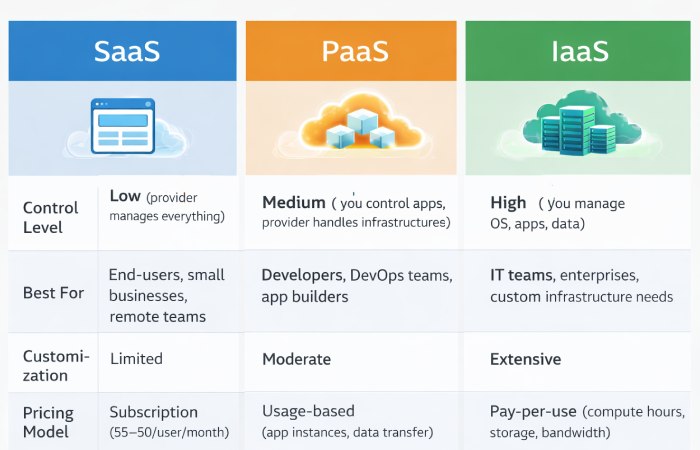
| Factor | SaaS | PaaS | IaaS |
|---|---|---|---|
| Control Level | Low (provider manages everything) | Medium (you control apps, provider handles infrastructure) | High (you manage OS, apps, data) |
| Examples | Salesforce, Google Workspace, Zoom | Heroku, AWS Elastic Beanstalk, Azure App Service | AWS EC2, Google Compute Engine, Azure VMs |
| Best For | End-users, small businesses, remote teams | Developers, DevOps teams, app builders | IT teams, enterprises, custom infrastructure needs |
| Customization | Limited | Moderate | Extensive |
| Pricing Model | Subscription (5−50/user/month) | Usage-based (app instances, data transfer) | Pay-per-use (compute hours, storage, bandwidth) |
| Pros | Easy to use, no IT expertise needed, automatic updates | Faster development, scalable, no server management | Full control, flexibility, supports legacy migration |
| Cons | Vendor lock-in, limited customization, data control issues | Platform constraints, vendor dependency | Requires IT expertise, higher management complexity |
12 Real-World Cloud Computing Applications (Categorized)
1. Data Storage & Backup
Examples: Google Drive, Dropbox, Microsoft OneDrive
How it works: Files are stored on remote servers with automatic synchronization across devices. Multi-region redundancy ensures data availability even during local hardware failures.
Use case: A marketing team stores campaign assets in Google Drive, enabling real-time collaboration across New York, London, and Tokyo without version conflicts.
2. Collaboration & Productivity
Examples: Slack, Microsoft Teams, Notion
How it works: Cloud-based platforms centralize communication, file sharing, and project management in a single interface, accessible from any device.
Use case: Remote software teams use Slack for instant messaging, integrated with GitHub for code updates and Jira for task tracking.
3. Streaming & Content Delivery
Examples: Netflix, Spotify, YouTube
How it works: Content is hosted on distributed edge servers (CDNs) worldwide. When a user in Mumbai requests a video, it’s delivered from the nearest server, reducing latency.
Use case: Netflix serves 250 million+ subscribers globally with personalized recommendations powered by cloud-based AI/ML models analyzing viewing patterns in real time.
4. E-commerce & Retail
Examples: Shopify, Amazon, BigCommerce
How it works: Cloud platforms handle inventory management, payment processing, customer data, and order fulfillment at scale. Auto-scaling ensures uptime during Black Friday traffic spikes.
Use case: A small business launches an online store on Shopify, scaling from 100 to 50,000 daily visitors during a viral marketing campaign without infrastructure changes.
5. Customer Relationship Management (CRM)
Examples: Salesforce, HubSpot, Zoho CRM
How it works: Centralized cloud databases track customer interactions, sales pipelines, and marketing campaigns. AI-driven insights predict lead conversion probabilities.
Use case: A sales team uses Salesforce to track 10,000+ leads, automate follow-ups, and forecast revenue with 95% accuracy.
6. Big Data Analytics
Examples: AWS Redshift, Google BigQuery, Snowflake
How it works: Cloud data warehouses use distributed computing to process petabytes of data. Queries that would take hours on-premise complete in seconds.
Use case: A retail chain analyzes 50 million transactions to identify buying patterns, optimize pricing, and reduce inventory waste by 18%.
7. Artificial Intelligence & Machine Learning
Examples: AWS SageMaker, Google AI Platform, Azure Machine Learning
How it works: Cloud platforms provide GPU clusters, pre-trained models, and AutoML tools to train AI models without owning expensive hardware.
Use case: A fintech startup builds a fraud detection model using Azure ML, processing 1 million transactions/day with 99.2% accuracy.
8. Development & Testing Environments
Examples: GitHub, GitLab, AWS CodePipeline
How it works: Developers push code to cloud-based repositories, triggering automated testing, integration, and deployment pipelines (CI/CD).
Use case: A SaaS company deploys 20+ production updates daily using GitHub Actions, reducing deployment time from 4 hours to 12 minutes.
9. Disaster Recovery & Business Continuity
Examples: Veeam Cloud, Acronis Cyber Backup, AWS Backup
How it works: Critical data is replicated across geographically dispersed data centers. If the primary site fails, workloads automatically shift to backup regions.
Use case: A financial services firm experiences a ransomware attack. Cloud backups restore operations within 2 hours, avoiding $5M+ in downtime losses.
10. Email & Communication
Examples: Gmail, Outlook (Microsoft 365), ProtonMail
How it works: Email servers run in the cloud with spam filtering, encryption, and unlimited storage. Multi-factor authentication secures access.
Use case: A Fortune 500 company migrates 100,000 employee mailboxes to Microsoft 365, eliminating on-premise Exchange servers and reducing IT costs by 35%.
11. Accounting & Finance
Examples: QuickBooks Online, Xero, FreshBooks
How it works: Cloud-based accounting software tracks invoices, expenses, payroll, and tax compliance with real-time synchronization across devices.
Use case: A freelance designer uses QuickBooks Online to automate invoicing, track expenses, and generate tax reports without hiring an accountant.
12. Human Resources & Payroll
Examples: Workday, BambooHR, Gusto
How it works: Cloud HR platforms manage employee records, benefits, time tracking, and payroll processing with compliance automation.
Use case: A mid-sized tech company uses BambooHR to onboard 200 new hires remotely, reducing HR paperwork by 70%.
Cloud Computing Applications by Industry
Healthcare
Applications: Electronic Health Records (EHR), telemedicine, medical imaging storage
How it works: Hospitals store patient data in HIPAA-compliant cloud databases (e.g., AWS HIPAA, Azure Health Data Services), enabling secure access for doctors, specialists, and patients.
Real-world impact: During COVID-19, telemedicine platforms like Teladoc scaled to 10 million+ virtual consultations/month, relying on cloud infrastructure to handle demand spikes.
Compliance note: Healthcare providers must ensure cloud platforms meet HIPAA, GDPR, and HITECH Act requirements. The U.S. Department of Health & Human Services provides official HIPAA compliance guidance.
Education
Applications: Learning Management Systems (LMS), virtual classrooms, student data management
How it works: Platforms like Google Classroom, Canvas, and Blackboard host course materials, assignments, and video lectures in the cloud, accessible to students worldwide.
Real-world impact: Universities shifted to cloud-based LMS during the pandemic, supporting 1 billion+ students globally with remote learning.
Finance & Fintech
Applications: Mobile banking, fraud detection, blockchain integration
How it works: Banks use cloud AI/ML models to analyze transaction patterns and flag fraud in real time. Blockchain networks (e.g., AWS Blockchain, Azure Blockchain) run on cloud infrastructure.
Real-world impact: JPMorgan Chase migrated 40% of applications to the cloud, improving transaction processing speed by 3x and reducing fraud losses by $200M annually.
Compliance note: Financial institutions must comply with PCI-DSS, SOX, and regional regulations. The Payment Card Industry Security Standards Council provides data security frameworks.
Retail & E-commerce
Applications: Inventory management, personalized marketing, omnichannel platforms
How it works: Retailers use cloud analytics to track inventory in real time, predict demand, and personalize recommendations (e.g., Amazon’s recommendation engine processes 35% of total sales).
Real-world impact: Target uses Google Cloud to analyze 50 billion data points/week, optimizing supply chains and reducing stockouts by 22%.
Manufacturing
Applications: IoT integration, supply chain optimization, predictive maintenance
How it works: IoT sensors on factory equipment send data to cloud platforms (AWS IoT, Azure IoT Hub) for real-time monitoring. AI models predict equipment failures before they occur.
Real-world impact: General Electric uses cloud-based predictive maintenance to reduce unplanned downtime by 20%, saving $1.2B annually.
Real Estate
Applications: Property management software, virtual tours, CRM for agents
How it works: Cloud platforms centralize tenant data, lease agreements, and maintenance requests. Virtual tour software (Matterport) uses cloud rendering for 3D property visualization.
Real-world impact: Real estate agencies using cloud CRMs report 30% faster deal closures due to improved lead tracking.
Entertainment & Media
Applications: Video streaming, game hosting, content distribution networks (CDNs)
How it works: Media companies use AWS CloudFront, Google Cloud CDN, and Azure CDN to deliver content globally with low latency. Cloud transcoding converts videos into multiple formats for different devices.
Real-world impact: Disney+ launched on AWS, scaling to 100 million subscribers in 16 months without infrastructure bottlenecks.
Key Benefits of Cloud Computing Applications

Scalability and Elasticity
Automatically adjust resources based on demand. E-commerce sites handle Black Friday traffic spikes without manual intervention.
Cost Efficiency (Pay-as-You-Go)
Eliminate upfront hardware costs. Pay only for resources used, reducing capital expenses by 40-60% for most businesses.
Remote Accessibility
Access applications from any device, anywhere. Remote teams collaborate as if in the same office.
Automatic Updates and Maintenance
Providers handle patches, security updates, and feature releases. Zero downtime for users.
Enhanced Collaboration
Real-time document editing, shared workspaces, and integrated communication tools improve productivity by 25-35%.
Disaster Recovery and Redundancy
Data is replicated across multiple regions. Recovery Time Objectives (RTO) drop from days to minutes.
Common Challenges & Limitations
Vendor Lock-In
Proprietary APIs and data formats make switching providers costly and complex. Mitigation: Use open standards (Kubernetes, Docker) and multi-cloud strategies.
Security and Compliance Risks
Multi-tenancy vulnerabilities, misconfigurations, and data breaches are ongoing concerns. Example: In 2023, a misconfigured AWS S3 bucket exposed 100M+ customer records.
Mitigation: Follow NIST Cybersecurity Framework and ensure providers hold ISO 27001 certification.
Downtime and Dependency on Internet Connectivity
Provider outages halt operations. Example: AWS outages in 2021 disrupted Netflix, Slack, and Coinbase for hours.
Mitigation: Use multi-region deployments and hybrid cloud architectures.
Data Sovereignty and Regulatory Concerns
Storing data in foreign jurisdictions may violate GDPR, CCPA, or industry-specific laws.
Mitigation: Choose providers with regional data centers and compliance certifications. The European Commission’s GDPR portal provides official guidance.
Hidden Costs and Unpredictable Pricing
Data egress fees, storage overages, and premium support tiers inflate costs unexpectedly.
Mitigation: Use cost management tools (AWS Cost Explorer, Azure Cost Management) and set budget alerts.
How to Choose the Right Cloud Application (Decision Framework)
Step 1: Identify Your Primary Use Case
- Storage & collaboration? → SaaS (Google Workspace, Dropbox)
- Custom app development? → PaaS (Heroku, AWS Elastic Beanstalk)
- Full infrastructure control? → IaaS (AWS EC2, Azure VMs)
Step 2: Evaluate Service Model Fit
- No IT team? → SaaS (provider manages everything)
- Developers on staff? → PaaS (faster development)
- Complex legacy systems? → IaaS (maximum flexibility)
Step 3: Consider Industry-Specific Compliance Requirements
- Healthcare: HIPAA, HITECH Act
- Finance: PCI-DSS, SOX, regional banking regulations
- Government: FedRAMP, FISMA
- Global operations: GDPR, CCPA, data residency laws
Step 4: Assess Vendor Reliability and SLA Guarantees
- Look for 99.9%+ uptime SLAs with financial penalties for breaches
- Check incident history (AWS Status, Azure Status pages)
- Verify certifications: ISO 27001, SOC 2, PCI-DSS
Step 5: Calculate Total Cost of Ownership (TCO)
- Include: Subscription fees, data transfer costs, storage overages, support tiers, training
- Compare 3-year TCO vs on-premise infrastructure
- Account for hidden costs: Migration, API integrations, exit fees
Step 6: Plan for Scalability and Future Growth
- Can the platform handle 10x growth without major re-architecture?
- Does it support multi-region expansion?
- Are there lock-in risks if you outgrow the provider?
Emerging Trends in Cloud Applications (2026)
AI/ML-Powered Cloud Services
Cloud providers embed AI into applications by default. Examples: AWS Personalize (recommendation engines), Google Cloud Vision API (image recognition), Azure Cognitive Services (natural language processing).
Impact: By 2026, 70% of cloud applications integrate AI/ML capabilities, automating tasks like customer support (chatbots), fraud detection, and predictive analytics.
Edge Computing Integration
Processing data closer to the source (IoT devices, mobile phones) reduces latency. Example: AWS Wavelength brings compute to 5G networks, enabling sub-10ms response times for gaming and autonomous vehicles.
Serverless and Event-Driven Architectures
Serverless platforms (AWS Lambda, Azure Functions) let developers run code without managing servers. You pay only when code executes, reducing costs by 60-80% for sporadic workloads.
Use case: A news site uses AWS Lambda to process image uploads. Instead of running servers 24/7, Lambda activates only when images are uploaded, cutting costs from 5,000/monthto300.
Green Cloud and Sustainability Initiatives
Cloud providers commit to carbon-neutral operations. Examples:
- Google Cloud: 100% renewable energy since 2017
- Microsoft Azure: Carbon negative by 2030 goal
- AWS: 100% renewable energy by 2025 target
Impact: Enterprises migrating to cloud reduce carbon footprint by 88% vs on-premise data centers (Accenture research).
Quantum Computing as a Service
Early-stage quantum computing platforms (AWS Braket, Azure Quantum, IBM Quantum) are accessible via cloud. Potential applications: Drug discovery, financial modeling, cryptography.
FAQs About Cloud Computing Applications
1. What is the difference between cloud computing and cloud applications?
Cloud computing is the underlying infrastructure (servers, storage, networking) delivered over the internet. Cloud applications are the software programs that run on this infrastructure. Think of cloud computing as the highway; cloud applications are the cars driving on it.
2. What are the most popular cloud computing applications?
- Productivity: Google Workspace, Microsoft 365
- CRM: Salesforce, HubSpot
- Communication: Slack, Zoom, Microsoft Teams
- Storage: Google Drive, Dropbox, OneDrive
- Streaming: Netflix, Spotify
- E-commerce: Shopify, BigCommerce
- Development: GitHub, AWS, Heroku
3. Are cloud applications secure?
Cloud applications can be secure if providers follow best practices:
- Encryption (data at rest and in transit)
- Multi-factor authentication (MFA)
- Compliance certifications (ISO 27001, SOC 2, HIPAA)
- Regular security audits
However, risks include data breaches, misconfigurations, and vendor vulnerabilities. Organizations must implement zero-trust security models and conduct regular audits. The NIST Cybersecurity Framework provides comprehensive security guidance.
4. How much do cloud applications cost?
Pricing varies by service model:
- SaaS: Subscription-based (5−50/user/month). Example: Microsoft 365 starts at $6/user/month.
- PaaS: Usage-based (app instances, data transfer). Example: Heroku charges 25−500/month depending on dyno hours.
- IaaS: Pay-per-use (compute hours, storage, bandwidth). Example: AWS EC2 costs 0.10−5/hour depending on instance type.
Hidden costs: Data egress fees, storage overages, premium support, and migration expenses can add 20-40% to base pricing.
5. Can small businesses benefit from cloud applications?
Yes. Cloud applications reduce upfront IT costs, enable remote work, and scale with growth. Examples:
- A freelance designer uses QuickBooks Online ($15/month) instead of hiring an accountant.
- A 10-person startup uses Slack (free tier) and Google Workspace ($6/user/month) instead of building email servers.
- An online retailer launches on Shopify (29/month)insteadofinvesting50K+ in custom e-commerce development.
Cost savings: Small businesses report 30-50% lower IT expenses after migrating to cloud.
6. What industries use cloud computing the most?
Top industries by cloud adoption:
- Technology & SaaS (98% adoption)
- Financial Services (92%)
- Healthcare (85%)
- Retail & E-commerce (83%)
- Manufacturing (78%)
- Education (76%)
- Media & Entertainment (74%)
Why? These industries handle large data volumes, require scalability, and benefit from AI/ML integration.
Final Verdict: Who Should Use Cloud Computing Applications?
Ideal for:
- Startups and small businesses seeking low upfront costs and rapid deployment
- Remote and distributed teams needing real-time collaboration
- Data-heavy industries (finance, healthcare, retail) requiring scalable storage and analytics
- Developers building modern applications without infrastructure management
- Enterprises modernizing legacy systems and improving disaster recovery
Be cautious if:
- You operate in highly regulated industries without in-house compliance expertise (healthcare, finance)
- You have strict data sovereignty requirements (government, defense)
- You rely on legacy on-premise systems with complex integration needs
- You have unpredictable workloads that may trigger hidden costs
Practical Recommendation
Start with SaaS for immediate productivity gains (Google Workspace, Salesforce, Slack).
Scale to PaaS if you’re building custom applications (Heroku, AWS Elastic Beanstalk).
Move to IaaS when you need full infrastructure control (AWS EC2, Azure VMs).
Key success factors:
- Choose providers with regional data centers for compliance.
- Implement multi-cloud or hybrid strategies to avoid vendor lock-in.
- Use cost management tools to prevent budget overruns.
- Follow NIST Cybersecurity Framework and ensure ISO 27001 certification.
Bottom line: Cloud computing applications are no longer optional—they’re the foundation of modern business. With the right strategy, they deliver 40-60% cost savings, 10x scalability, and global accessibility that on-premise infrastructure cannot match.
About Technologyies
Technologyies publishes practical, easy-to-understand content on health, technology, business, marketing, and lifestyle. Articles are based mainly on reputable, publicly available information, with AI tools used only to help research, organise, and explain topics more clearly so the focus stays on real‑world usefulness rather than jargon or unnecessary complexity.
Disclaimer:
This article is for general information only and may not reflect the latest changes in cloud services, pricing, or regulations. Always confirm details with official provider documentation or a qualified professional before making decisions.